Menu
Your Cart

Samsung 24" LS24C360EAW FHD Monitor

Samsung 24" LS24C360EAW FHD Monitor
Out Of Stock
Samsung 24" LS24C360EAW FHD Monitor
  • Stock: Out Of Stock
  • Model: LS24C360EAW
TK 0/-
Ex Tax: TK 0/-

Key Features

    • Brand:Samsung
    • Model: LS24C360EAW
    • Display:VA, 75Hz, 4ms (GTG)
    • Ports: 1x HDMI,1x D-Sub
    • Warranty:3Years
Specification
Display Features
Display Size24 Inch
Display TypeLED
Panel TypeVA
ResolutionFull HD (1920 x 1080)
Aspect Ratio16:9
Viewing Angle178°/178°
BrightnessBrightness (Typical): 250cd/㎡ Brightness (Min): 200 cd/㎡
Contrast Ratio3,000:1(Typ.)
Refresh RateMax 75Hz
Color Gamut72%
Response Time4ms (GTG)
Video Features
Low Blue LightYes
Free Sync SupportYes
Audio Features
Speaker (Built In)No
Connectivity
HDMI1x HDMI 1.4
Mechanical Design
Tilt2.0º(±2.0º) ~ 22º(±2.0º)
Vesa Wall Mount75 x 75
Power
Power Consumption25W
VoltageAC 100~240V
Physical Attributes
ColorBlack
DimensionsSet Dimension with Stand (WxHxD): 547.8 x 416.3 x 214.0 mm Set Dimension without Stand (WxHxD): 547.8 x 325.6 x 108.2 mm
WeightSet Weight with Stand: 3.1 kg Set Weight without Stand: 2.6 kg
Warranty Information
Warranty3 Years
Description

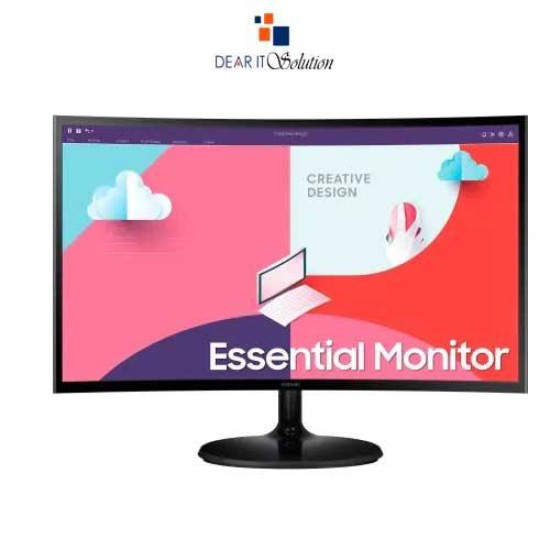
Samsung 24" LS24C360EAW FHD Curved Monitor 


The Samsung LS24C360EAW 24" 75Hz FHD Curved Monitor is designed for users who crave an immersive and high-quality visual experience. With a 1920 x 1080 Full HD resolution and a 75Hz refresh rate, this monitor delivers stunning clarity and fluid motion, making it ideal for both work and entertainment. Its elegant curved design enhances the viewing experience by wrapping the screen around your field of vision, providing a more engaging and comfortable experience for long hours of use.

Enhanced Visuals and Features

Equipped with AMD FreeSync technology, the Samsung LS24C360EAW ensures that your gaming and video playback are smooth and free from tearing. The monitor's 3000:1 contrast ratio and 250 nits brightness produce vibrant colors and deep blacks, allowing for a rich and immersive display. Its 178-degree viewing angle means you can enjoy consistent colors and clarity from various positions, whether you're gaming, working, or streaming your favorite shows.

Best Price in BD for Samsung LS24C360EAW Monitor

Looking for the best price in BD for the Samsung LS24C360EAW 24" Curved Monitor? Look no further than Dear IT Solution. This monitor combines exceptional performance with affordability, making it a perfect choice for gamers, professionals, and anyone who appreciates high-quality visuals. Experience your content like never before with this stunning display that elevates any setup.

Buy from Dear IT Showroom or Online

You can purchase the Samsung LS24C360EAW 24" 75Hz FHD Curved Monitor at Dear IT Solution, either in-store or online. We are committed to providing the best price in BD along with excellent customer service. Whether you're upgrading your gaming setup or enhancing your workspace, this monitor is a fantastic investment that won't disappoint.

Maintenance Tips

To ensure the longevity and optimal performance of your Samsung LS24C360EAW monitor, follow these maintenance tips:

Use a Soft Cloth: Clean the screen gently with a microfiber cloth to avoid scratches.
Avoid Direct Sunlight: Position the monitor away from direct sunlight to prevent overheating and glare.
Cable Management: Organize your cables to prevent tangling and accidental disconnection.
Turn Off When Not in Use: Switch off the monitor during long periods of inactivity to conserve energy and prolong its life.
Adhering to these tips can help maintain the monitor's quality and performance for years to come.

Review

Write a review

Note: HTML is not translated!
Bad Good
Critial Path: Hello world!
Hello world!
/** * @license * Copyright 2017 Google LLC * SPDX-License-Identifier: Apache-2.0 *//** * @fileoverview Diagnostic audit that lists all JavaScript libraries detected on the page */import {Audit} from '../audit.js'; import * as i18n from '../../lib/i18n/i18n.js';const UIStrings = { /** Title of a Lighthouse audit that provides detail on the Javascript libraries that are used on the page. */ title: 'Detected JavaScript libraries', /** Description of a Lighthouse audit that tells the user what this audit is detecting. This is displayed after a user expands the section to see more. No character length limits. */ description: 'All front-end JavaScript libraries detected on the page. [Learn more about this JavaScript library detection diagnostic audit](https://developer.chrome.com/docs/lighthouse/best-practices/js-libraries/).', /** Label for a column in a data table; entries will be the version numbers of the detected Javascript libraries. */ columnVersion: 'Version', };const str_ = i18n.createIcuMessageFn(import.meta.url, UIStrings);class JsLibrariesAudit extends Audit { /** * @return {LH.Audit.Meta} */ static get meta() { return { id: 'js-libraries', title: str_(UIStrings.title), scoreDisplayMode: Audit.SCORING_MODES.INFORMATIVE, description: str_(UIStrings.description), requiredArtifacts: ['Stacks'], }; }/** * @param {LH.Artifacts} artifacts * @return {LH.Audit.Product} */ static audit(artifacts) { const libDetails = artifacts.Stacks .filter(stack => stack.detector === 'js') // Don't show the fast paths in the table. .filter(stack => !stack.id.endsWith('-fast')) .map(stack => ({ name: stack.name, version: stack.version, npm: stack.npm, }));/** @type {LH.Audit.Details.Table['headings']} */ const headings = [ {key: 'name', valueType: 'text', label: str_(i18n.UIStrings.columnName)}, {key: 'version', valueType: 'text', label: str_(UIStrings.columnVersion)}, ]; const details = Audit.makeTableDetails(headings, libDetails);const debugData = { type: /** @type {const} */ ('debugdata'), stacks: artifacts.Stacks.map(stack => { return { id: stack.id, version: stack.version, }; }), };if (!libDetails.length) { return {score: null, notApplicable: true}; }return { score: 1, // Always pass for now. details: { ...details, debugData, }, }; } }export default JsLibrariesAudit; export {UIStrings};