Menu
Your Cart

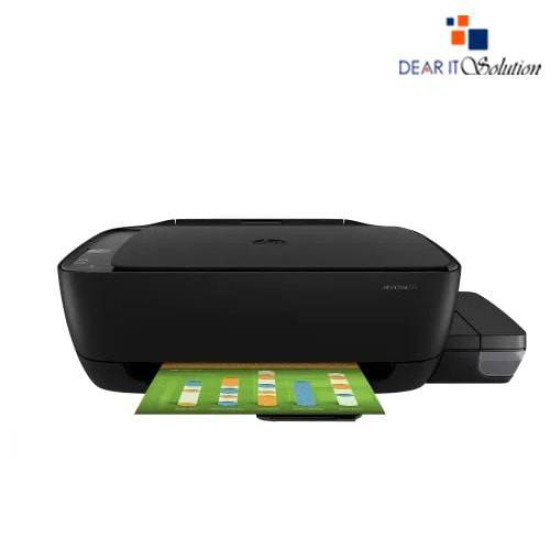
HP Ink Tank 315 All-in-One Printer

HP Ink Tank 315 All-in-One Printer
-10 %
HP Ink Tank 315 All-in-One Printer
  • Price: TK 15,000/-
  • special price: TK 13,500/-
  • Stock: In Stock
  • Model: Ink Tank 315
TK 13,500/-
TK 15,000/-
Ex Tax: TK 13,500/-

Key Features

    • Model: Ink Tank 315
    • Functions: Print, Copy, Scan
    • Up to 6000 black/ 8000 color pages
    • Ultra-high capacity ink tank
    • Spill-free ink refill system
    Specification
    General Feature
    BrandHp
    ModelInk Tank 315
    Print
    TechnologyBlack: Up to 19 ppm (draft, A4); Up to 8 ppm (ISO); Color: Up to 15 ppm (draft, A4); Up to 5 ppm (ISO)
    Print SpeedBlack: Up to 19 ppm (draft, A4); Up to 8 ppm (ISO); Color: Up to 15 ppm (draft, A4); Up to 5 ppm (ISO)
    Print ResolutionBlack (best): Up to 1200 x 1200 rendered dpi; Color (best): Up to 4800 x 1200 optimized dpi color
    DuplexManual
    Support
    Toner/ Cartridge/ RefillHP GT53 Black, HP GT52 Cyan, HP GT52 Yellow, HP GT51 Magenta (Please make sure your existing & mentioned toner/cartridge/ink bottle models are the same before buying a new one)
    Software
    Software info Windows 7, 8, 8.1, 10, XP, Vista, Server 2008, 2008 R2 and higher, 2012, 2012 R2, 2016, OS X v10.10 Yosemite, OS X v10.11 El Capitan, macOS Sierra v10.12
    Physical Attributes
    ColorBlack
    Warranty Information
    Warranty01year Limited warranty
    Description

    HP Ink Tank 315 All-in-One Printer

    The HP Ink Tank 315 All-in-One Printer is a versatile, high-performance printer designed for home offices and small businesses. This all-in-one device offers printing, scanning, and copying functions, making it a cost-effective and reliable solution for all your everyday printing needs. Featuring a high-capacity ink tank system, the printer allows for more pages at a lower cost per page, making your printing tasks more efficient and affordable.

    The HP Ink Tank 315 delivers sharp, vibrant prints for photos and documents, with a high print resolution. Its compact and space-saving design is perfect for limited spaces, while the user-friendly interface ensures a smooth and easy operation. Whether you're printing reports, photos, or presentations, this printer provides consistent, excellent quality with fast printing speeds.

    Compatible With:

    • PCs, laptops, and tablets supporting Windows and macOS.
    • Wi-Fi and USB connectivity for flexible usage.

    Maintenance Tips:

    • Keep the printer in a dry, dust-free environment to prevent ink clogging.
    • Clean the print head regularly for optimal performance.
    • Always use genuine HP ink for the best results and printer longevity.

    Buying Suggestion:

    For affordable, high-quality printing, Dear IT Solution offers the HP Ink Tank 315 All-in-One Printer at the best price in Bangladesh. Ideal for home offices and small businesses, this printer guarantees cost-effective printing with excellent quality. Order now from Dear IT Solution for premium quality and guaranteed satisfaction.

    Best quality product insured in Bangladesh.

    Review

    Write a review

    Note: HTML is not translated!
    Bad Good
    Critial Path: Hello world!
    Hello world!
    /** * @license * Copyright 2017 Google LLC * SPDX-License-Identifier: Apache-2.0 *//** * @fileoverview Diagnostic audit that lists all JavaScript libraries detected on the page */import {Audit} from '../audit.js'; import * as i18n from '../../lib/i18n/i18n.js';const UIStrings = { /** Title of a Lighthouse audit that provides detail on the Javascript libraries that are used on the page. */ title: 'Detected JavaScript libraries', /** Description of a Lighthouse audit that tells the user what this audit is detecting. This is displayed after a user expands the section to see more. No character length limits. */ description: 'All front-end JavaScript libraries detected on the page. [Learn more about this JavaScript library detection diagnostic audit](https://developer.chrome.com/docs/lighthouse/best-practices/js-libraries/).', /** Label for a column in a data table; entries will be the version numbers of the detected Javascript libraries. */ columnVersion: 'Version', };const str_ = i18n.createIcuMessageFn(import.meta.url, UIStrings);class JsLibrariesAudit extends Audit { /** * @return {LH.Audit.Meta} */ static get meta() { return { id: 'js-libraries', title: str_(UIStrings.title), scoreDisplayMode: Audit.SCORING_MODES.INFORMATIVE, description: str_(UIStrings.description), requiredArtifacts: ['Stacks'], }; }/** * @param {LH.Artifacts} artifacts * @return {LH.Audit.Product} */ static audit(artifacts) { const libDetails = artifacts.Stacks .filter(stack => stack.detector === 'js') // Don't show the fast paths in the table. .filter(stack => !stack.id.endsWith('-fast')) .map(stack => ({ name: stack.name, version: stack.version, npm: stack.npm, }));/** @type {LH.Audit.Details.Table['headings']} */ const headings = [ {key: 'name', valueType: 'text', label: str_(i18n.UIStrings.columnName)}, {key: 'version', valueType: 'text', label: str_(UIStrings.columnVersion)}, ]; const details = Audit.makeTableDetails(headings, libDetails);const debugData = { type: /** @type {const} */ ('debugdata'), stacks: artifacts.Stacks.map(stack => { return { id: stack.id, version: stack.version, }; }), };if (!libDetails.length) { return {score: null, notApplicable: true}; }return { score: 1, // Always pass for now. details: { ...details, debugData, }, }; } }export default JsLibrariesAudit; export {UIStrings};