Menu
Your Cart

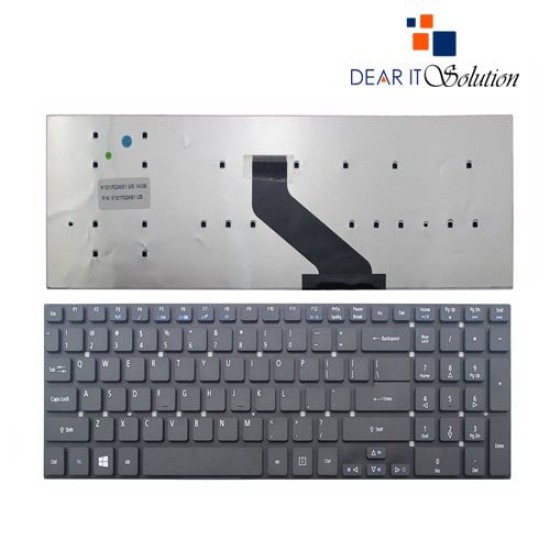
Acer NAV 50/D260/D255 Laptop Keyboard

Acer NAV 50/D260/D255 Laptop Keyboard
  • Price: TK 1,100/-
  • Stock: In Stock
  • Model: NAV 50/D260/D255
TK 1,100/-
Ex Tax: TK 1,100/-

Key Features

    • Laptop Keyboard for Acer
    • Layout: US & UK
    • Backlight Option : No
    • Size: Medium
    • Compatible With Aspire NAV 50/D260/D255
    Specification
    General Feature
    BrandAcer
    ModelNAV 50/D260/D255
    Physical Attributes
    ColorBlack
    Backlit OptionNo
    LayoutUs and Uk
    Compatible WithNAV 50/D260/D255
    Warranty Information
    Warranty03 Month
    Description

    Acer NAV 50/D260/D255 Laptop Keyboard
    The Acer NAV 50/D260/D255 Laptop Keyboard is a premium replacement solution, meticulously designed to restore the full functionality of your Acer laptop. If your keyboard is showing signs of wear, has unresponsive keys, or has been damaged, this replacement keyboard is the perfect choice to bring your device back to optimal performance. Designed specifically for Acer NAV 50, D260, and D255 laptop models, it offers a seamless fit and flawless compatibility.

    Built to the highest quality standards, this keyboard ensures smooth and accurate key responses, enabling a comfortable and efficient typing experience. With a standard QWERTY layout, the keyboard maintains familiarity, making it ideal for everyday use, whether you’re working on documents, browsing online, or gaming. Its ergonomic design ensures reduced typing fatigue, even during extended use, making it perfect for both professionals and students.

    The Acer NAV 50/D260/D255 Keyboard features durable keycaps with precise feedback, ensuring consistent performance over time. The high-quality construction resists wear and tear, ensuring the keyboard retains its original look and functionality for years. Additionally, it is designed to withstand minor spills and impacts, providing a reliable solution for regular, everyday usage. The sleek black finish of the keyboard complements your laptop’s design, maintaining its professional appearance.

    Replacing your Acer keyboard has never been easier. This replacement keyboard is engineered to align perfectly with your laptop, requiring no additional modifications or tools for installation. It integrates seamlessly with your device, restoring its original typing performance. With this keyboard, you can avoid costly repairs or the need to replace your entire laptop, making it a budget-friendly and efficient solution.

    Key features of the Acer NAV 50/D260/D255 Laptop Keyboard include its lightweight and compact design, ensuring the portability of your laptop remains unaffected. Its sturdy build quality ensures it can handle the demands of daily use while maintaining consistent performance. Whether you are a student working on assignments, a professional managing projects, or a casual user engaging in everyday tasks, this keyboard is designed to cater to all your needs.

    Buy Acer NAV 50/D260/D255 Laptop Keyboard from Dear IT Solution
    In Bangladesh, you can purchase the original Acer NAV 50/D260/D255 Laptop Keyboard from Dear IT Solution. We stock a wide range of the latest laptop keyboards to meet your needs. Order online or visit our shop to secure yours at the best price. The Acer NAV 50/D260/D255 Laptop Keyboard comes with a 3-month warranty, offering peace of mind and dependable performance.

    Review

    Write a review

    Note: HTML is not translated!
    Bad Good
    Critial Path: Hello world!
    Hello world!
    /** * @license * Copyright 2017 Google LLC * SPDX-License-Identifier: Apache-2.0 *//** * @fileoverview Diagnostic audit that lists all JavaScript libraries detected on the page */import {Audit} from '../audit.js'; import * as i18n from '../../lib/i18n/i18n.js';const UIStrings = { /** Title of a Lighthouse audit that provides detail on the Javascript libraries that are used on the page. */ title: 'Detected JavaScript libraries', /** Description of a Lighthouse audit that tells the user what this audit is detecting. This is displayed after a user expands the section to see more. No character length limits. */ description: 'All front-end JavaScript libraries detected on the page. [Learn more about this JavaScript library detection diagnostic audit](https://developer.chrome.com/docs/lighthouse/best-practices/js-libraries/).', /** Label for a column in a data table; entries will be the version numbers of the detected Javascript libraries. */ columnVersion: 'Version', };const str_ = i18n.createIcuMessageFn(import.meta.url, UIStrings);class JsLibrariesAudit extends Audit { /** * @return {LH.Audit.Meta} */ static get meta() { return { id: 'js-libraries', title: str_(UIStrings.title), scoreDisplayMode: Audit.SCORING_MODES.INFORMATIVE, description: str_(UIStrings.description), requiredArtifacts: ['Stacks'], }; }/** * @param {LH.Artifacts} artifacts * @return {LH.Audit.Product} */ static audit(artifacts) { const libDetails = artifacts.Stacks .filter(stack => stack.detector === 'js') // Don't show the fast paths in the table. .filter(stack => !stack.id.endsWith('-fast')) .map(stack => ({ name: stack.name, version: stack.version, npm: stack.npm, }));/** @type {LH.Audit.Details.Table['headings']} */ const headings = [ {key: 'name', valueType: 'text', label: str_(i18n.UIStrings.columnName)}, {key: 'version', valueType: 'text', label: str_(UIStrings.columnVersion)}, ]; const details = Audit.makeTableDetails(headings, libDetails);const debugData = { type: /** @type {const} */ ('debugdata'), stacks: artifacts.Stacks.map(stack => { return { id: stack.id, version: stack.version, }; }), };if (!libDetails.length) { return {score: null, notApplicable: true}; }return { score: 1, // Always pass for now. details: { ...details, debugData, }, }; } }export default JsLibrariesAudit; export {UIStrings};