Menu
Your Cart

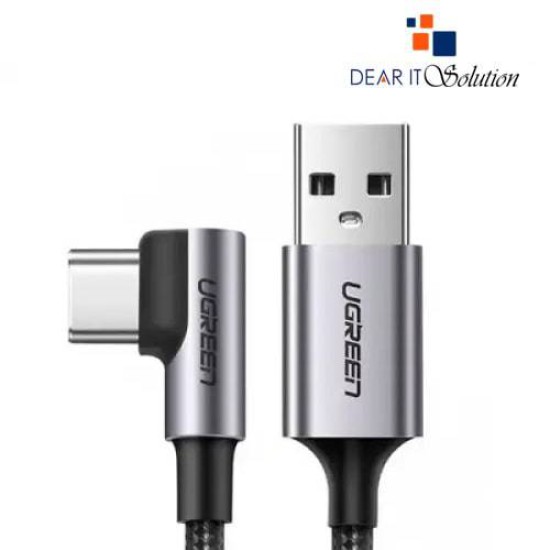
Ugreen US284 1M Right Angle 90° USB Type-A 2.0 To USB Type-C Cable #50941

Ugreen US284 1M Right Angle 90° USB Type-A 2.0 To USB Type-C Cable #50941
  • Price: TK 370/-
  • Stock: In Stock
  • Model: 50941
TK 370/-
Ex Tax: TK 370/-

Key Features

    • MPN: 50941
    • Model: US287
    • Interface(s): USB Type-A Male, USB Type-C Male
    • Data Transfer Rates: Up to 480Mbps
    • Functions: Charging, Data Transfer
    • Cable Length: 1M
    Description

    Ugreen US284 1M Right Angle 90° USB Type-A 2.0 To USB Type-C Cable #50941

    The Ugreen US284 1M Right Angle 90° USB Type-A 2.0 To USB Type-C Cable is designed for a seamless and efficient connection between your USB Type-A enabled devices and USB Type-C devices. With a 1-meter length and a 90° right-angle connector, this cable offers a more comfortable and convenient setup for tight spaces, such as when charging or data transferring on your phone, laptop, or gaming console.

    The Ugreen US284 cable supports fast charging and data transfer at up to 480Mbps. Whether you are charging your device or syncing files, this high-quality cable ensures stable performance. Its compact design and durable construction provide long-lasting use and protection against wear and tear, making it a reliable companion for everyday use.

    Buying Suggestions from Dear IT Solution

    For the Ugreen US284 1M Right Angle 90° USB Type-A 2.0 To USB Type-C Cable, visit Dear IT Solution, your trusted source for tech accessories in Bangladesh.
    Order today for the best quality and exceptional customer service!


    Review

    Write a review

    Note: HTML is not translated!
    Bad Good
    Critial Path: Hello world!
    Hello world!
    /** * @license * Copyright 2017 Google LLC * SPDX-License-Identifier: Apache-2.0 *//** * @fileoverview Diagnostic audit that lists all JavaScript libraries detected on the page */import {Audit} from '../audit.js'; import * as i18n from '../../lib/i18n/i18n.js';const UIStrings = { /** Title of a Lighthouse audit that provides detail on the Javascript libraries that are used on the page. */ title: 'Detected JavaScript libraries', /** Description of a Lighthouse audit that tells the user what this audit is detecting. This is displayed after a user expands the section to see more. No character length limits. */ description: 'All front-end JavaScript libraries detected on the page. [Learn more about this JavaScript library detection diagnostic audit](https://developer.chrome.com/docs/lighthouse/best-practices/js-libraries/).', /** Label for a column in a data table; entries will be the version numbers of the detected Javascript libraries. */ columnVersion: 'Version', };const str_ = i18n.createIcuMessageFn(import.meta.url, UIStrings);class JsLibrariesAudit extends Audit { /** * @return {LH.Audit.Meta} */ static get meta() { return { id: 'js-libraries', title: str_(UIStrings.title), scoreDisplayMode: Audit.SCORING_MODES.INFORMATIVE, description: str_(UIStrings.description), requiredArtifacts: ['Stacks'], }; }/** * @param {LH.Artifacts} artifacts * @return {LH.Audit.Product} */ static audit(artifacts) { const libDetails = artifacts.Stacks .filter(stack => stack.detector === 'js') // Don't show the fast paths in the table. .filter(stack => !stack.id.endsWith('-fast')) .map(stack => ({ name: stack.name, version: stack.version, npm: stack.npm, }));/** @type {LH.Audit.Details.Table['headings']} */ const headings = [ {key: 'name', valueType: 'text', label: str_(i18n.UIStrings.columnName)}, {key: 'version', valueType: 'text', label: str_(UIStrings.columnVersion)}, ]; const details = Audit.makeTableDetails(headings, libDetails);const debugData = { type: /** @type {const} */ ('debugdata'), stacks: artifacts.Stacks.map(stack => { return { id: stack.id, version: stack.version, }; }), };if (!libDetails.length) { return {score: null, notApplicable: true}; }return { score: 1, // Always pass for now. details: { ...details, debugData, }, }; } }export default JsLibrariesAudit; export {UIStrings};