Menu
Your Cart

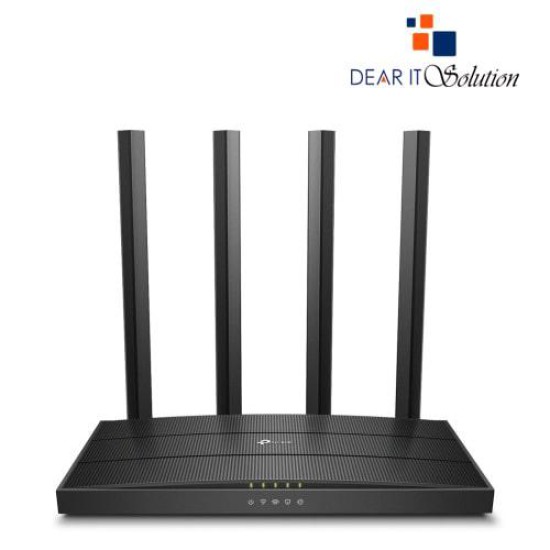
TP-Link Archer C80 AC1900 Wireless Gigabit Dual-Band MU-MIMO Wi-Fi Router

TP-Link Archer C80 AC1900 Wireless Gigabit Dual-Band MU-MIMO Wi-Fi Router
  • Price: TK 3,900/-
  • Stock: In Stock
  • Model: 80 AC1900
TK 3,900/-
Ex Tax: TK 3,900/-

Key Features

    • Model: Archer C80 AC1900
    • 4× Fixed High-Performance Antennas
    • 802.11ac Wave2 Wi-Fi, 1900Mbps
    • 3×3 MU-MIMO Technology
    • Data Transfer Rates: 1900Mbps (WiFi)
    Specification
    General Feature
    BrandTp-Link
    ModelC80 AC1900
    Interface1 x Gigabit WAN, 4 x Gigabit LAN
    Data Transfer1900 Mbps (WiFi): 5 GHz: 1300 Mbps (802.11ac) 2.4 GHz: 600 Mbps (802.11n)
    Antenna4× Fixed High-Performance Antennas Note: Multiple antennas form a signal-boosting array to cover more directions and large areas
    Technical Info
    Power adapter12 V ⎓ 1 A
    Physical Attributes
    ColorBlack
    Dimensions8.5 × 4.6 × 1.26 in (215 × 117 × 32 mm)
    Warranty Information
    Warranty01 Year
    Description

    TP-Link Archer C80 AC1900 Wireless Gigabit Dual-Band MU-MIMO Wi-Fi Router

    The TP-Link Archer C80 AC1900 Wireless Gigabit Dual-Band MU-MIMO Wi-Fi Router is designed to deliver superior wireless performance for your home or office. Offering a combined speed of 1900Mbps, it provides 600Mbps on the 2.4GHz band and 1300Mbps on the 5GHz band, ensuring high-speed internet access for all your online activities, including streaming, gaming, and browsing.

    This router is equipped with MU-MIMO technology, which allows multiple devices to connect and enjoy high-speed Wi-Fi without any slowdowns. It ensures a smooth and uninterrupted connection even when multiple devices are online at the same time, making it perfect for busy households or offices.

    With Beamforming technology, the Archer C80 focuses the Wi-Fi signal directly to your connected devices, improving both range and reliability. Whether you're connecting smartphones, laptops, smart TVs, or gaming consoles, this router guarantees a strong, stable signal throughout your home or office.

    The TP-Link Archer C80 also features Gigabit Ethernet ports, providing wired connections for devices that need the most stable and fastest internet speeds, such as desktop PCs, smart TVs, and gaming consoles. Additionally, the router supports Advanced WPA3 Encryption, ensuring your network remains secure from potential threats.

    The easy-to-use TP-Link Tether app allows you to manage your router settings and monitor your network from anywhere, giving you full control over your internet environment.


    BUYING SUGGESTIONS FROM DEAR IT SOLUTION

    At Dear IT Solution, we offer the TP-Link Archer C80 AC1900 Wireless Gigabit Dual-Band MU-MIMO Wi-Fi Router at the best price in Bangladesh. This router is ideal for users who need fast, reliable, and secure Wi-Fi connectivity for their home or office.

    With MU-MIMO technology, Beamforming, and Gigabit Ethernet ports, the Archer C80 ensures that every device gets optimal performance, even in a busy network environment. It is an excellent choice for high-demand activities like 4K streaming, gaming, and video conferencing, providing fast and consistent internet across multiple devices.

    Choose Dear IT Solution for the best quality product insured in Bangladesh, backed by our expert customer service. We ensure that you get the right solution for your connectivity needs, along with guidance and support.

    Upgrade your Wi-Fi experience today with the TP-Link Archer C80 AC1900 Wi-Fi Router and enjoy faster speeds, improved coverage, and enhanced security. Trust Dear IT Solution for your tech needs and experience exceptional service.

    Review

    Write a review

    Note: HTML is not translated!
    Bad Good
    Critial Path: Hello world!
    Hello world!
    /** * @license * Copyright 2017 Google LLC * SPDX-License-Identifier: Apache-2.0 *//** * @fileoverview Diagnostic audit that lists all JavaScript libraries detected on the page */import {Audit} from '../audit.js'; import * as i18n from '../../lib/i18n/i18n.js';const UIStrings = { /** Title of a Lighthouse audit that provides detail on the Javascript libraries that are used on the page. */ title: 'Detected JavaScript libraries', /** Description of a Lighthouse audit that tells the user what this audit is detecting. This is displayed after a user expands the section to see more. No character length limits. */ description: 'All front-end JavaScript libraries detected on the page. [Learn more about this JavaScript library detection diagnostic audit](https://developer.chrome.com/docs/lighthouse/best-practices/js-libraries/).', /** Label for a column in a data table; entries will be the version numbers of the detected Javascript libraries. */ columnVersion: 'Version', };const str_ = i18n.createIcuMessageFn(import.meta.url, UIStrings);class JsLibrariesAudit extends Audit { /** * @return {LH.Audit.Meta} */ static get meta() { return { id: 'js-libraries', title: str_(UIStrings.title), scoreDisplayMode: Audit.SCORING_MODES.INFORMATIVE, description: str_(UIStrings.description), requiredArtifacts: ['Stacks'], }; }/** * @param {LH.Artifacts} artifacts * @return {LH.Audit.Product} */ static audit(artifacts) { const libDetails = artifacts.Stacks .filter(stack => stack.detector === 'js') // Don't show the fast paths in the table. .filter(stack => !stack.id.endsWith('-fast')) .map(stack => ({ name: stack.name, version: stack.version, npm: stack.npm, }));/** @type {LH.Audit.Details.Table['headings']} */ const headings = [ {key: 'name', valueType: 'text', label: str_(i18n.UIStrings.columnName)}, {key: 'version', valueType: 'text', label: str_(UIStrings.columnVersion)}, ]; const details = Audit.makeTableDetails(headings, libDetails);const debugData = { type: /** @type {const} */ ('debugdata'), stacks: artifacts.Stacks.map(stack => { return { id: stack.id, version: stack.version, }; }), };if (!libDetails.length) { return {score: null, notApplicable: true}; }return { score: 1, // Always pass for now. details: { ...details, debugData, }, }; } }export default JsLibrariesAudit; export {UIStrings};