Menu
Your Cart

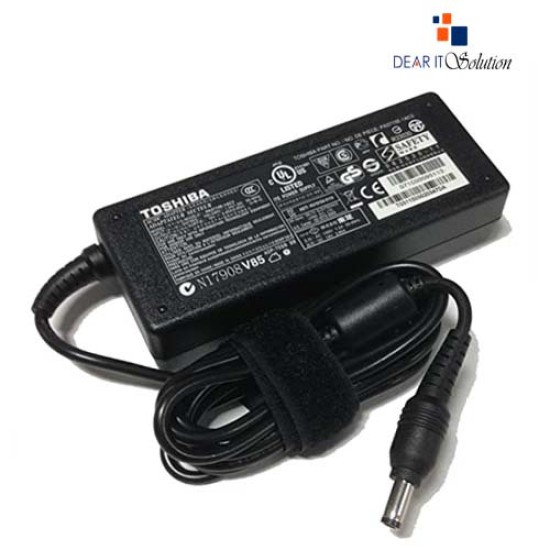
Charger For Toshiba Laptop 19V 3.42A

Charger For Toshiba Laptop 19V 3.42A
-33 %
Charger For Toshiba Laptop 19V 3.42A
  • Price: TK 900/-
  • special price: TK 600/-
  • Stock: In Stock
  • Model: C50, C650, c850 Serise
  • MPN: PA3714E-1AC3
TK 600/-
TK 900/-
Ex Tax: TK 600/-

Key Features

    • For Brand:Toshiba
    • For Model: C55,C55D,C655,C855,C855D,L745,L655,L755,L55,P755,Z30,Z930,Z830,S55,S55T
    • Output voltage:19V 3.42A
    • Tip Size: 5.5*2.5mm
    • Warranty: 6 Month
Specification
General Feature
For BrandToshiba
Model C50, C55, C55D, C55DT, C55T, C75, C75D, C655, C655D, C855, C855D, C650, C850
TypeTip Size: 5.5*2.5mm
Technical Info
Wattage (W)65W
Input VoltageAC100-240V / 50 ~ 60Hz
Output Voltage19v 3.42a
Warranty Information
Warranty6 Month
Description

Charger for Toshiba Satellite C55 C55D C655 C855 Laptops

Looking for a reliable and original charger for your Toshiba Satellite C55, C55D, C655, or C855 laptop? Dear IT Solution offers a high-quality Toshiba Satellite Laptop Charger that provides the perfect replacement for your existing adapter. This charger delivers a powerful output of DC 19V 3.42A with a 65W capacity. It ensures optimal performance for a wide range of Toshiba Satellite models, making it a versatile choice for many laptop users in Bangladesh.

Toshiba Charger For Compatibility

This adapter is equipped with a 5.5*2.5mm connector size, ensuring a secure and precise fit. Its wide compatibility range covers multiple Toshiba Satellite models, such as:

    Toshiba Satellite C50, C55, C55D, C55DT, C55T, C75, C75D, C655, C655D, C855, C855D, and CL15 Series
    Toshiba Satellite A100, A105, A135, A205, A215, A305, A505, A660, A665, P200, P750, P755, P850, P875, and L455 Series
    Toshiba Portege R30, R700, R830, R835, R935, Z30, Z40, Z50, Z830, Z835, Z930, Z935 Series
    Toshiba Mini NB200, NB205, NB250, NB255, NB305, NB505 Series

This charger is also a perfect fit for part numbers such as ADP-65JH BB, PA3467U-1ACA, PA3468E-1AC3, PA3714U-1ACA, PA5034U-1ACA, and many others. It provides consistent power, making it ideal for users who need a reliable replacement adapter for their Toshiba Satellite laptop.

Maintenance Tips for Longevity

To ensure your charger stays in optimal condition and lasts longer, follow these maintenance tips:

    Proper Cable Storage: Always store the cable in a loose coil to prevent it from bending or fraying. Never wrap it too tightly.
    Keep it Cool: Avoid using the charger in excessively hot or humid environments. Ensure it's placed in a well-ventilated area while in use.
    Unplug When Not in Use: Disconnect the charger from the power socket when not using your laptop to avoid overcharging and unnecessary power consumption.
    Inspect Regularly: Check the charger regularly for any signs of wear and tear. If you notice any damage, replace it immediately to avoid any safety hazards.
    Avoid Liquid Exposure: Keep the charger away from any liquids that could cause a short circuit or other damage.


Buying Suggestion from Dear IT Solution

At Dear IT Solution, we offer only genuine products with rigorous quality checks. Our Toshiba Satellite C55 Laptop Charger is certified for safety, complying with CE, FCC, and RoHS standards, ensuring that you get a reliable and durable product. With a competitive price in BD, you can be assured of the best value for your money.

You can buy this original Toshiba Satellite charger directly from Dear IT Solution—your one-stop destination for all laptop accessories in Bangladesh. We offer fast and secure delivery across the country, so you can get your charger quickly and conveniently. Visit our store or shop online today to ensure your laptop stays powered up and ready for work.

Review

Write a review

Note: HTML is not translated!
Bad Good
Critial Path: Hello world!
Hello world!
/** * @license * Copyright 2017 Google LLC * SPDX-License-Identifier: Apache-2.0 *//** * @fileoverview Diagnostic audit that lists all JavaScript libraries detected on the page */import {Audit} from '../audit.js'; import * as i18n from '../../lib/i18n/i18n.js';const UIStrings = { /** Title of a Lighthouse audit that provides detail on the Javascript libraries that are used on the page. */ title: 'Detected JavaScript libraries', /** Description of a Lighthouse audit that tells the user what this audit is detecting. This is displayed after a user expands the section to see more. No character length limits. */ description: 'All front-end JavaScript libraries detected on the page. [Learn more about this JavaScript library detection diagnostic audit](https://developer.chrome.com/docs/lighthouse/best-practices/js-libraries/).', /** Label for a column in a data table; entries will be the version numbers of the detected Javascript libraries. */ columnVersion: 'Version', };const str_ = i18n.createIcuMessageFn(import.meta.url, UIStrings);class JsLibrariesAudit extends Audit { /** * @return {LH.Audit.Meta} */ static get meta() { return { id: 'js-libraries', title: str_(UIStrings.title), scoreDisplayMode: Audit.SCORING_MODES.INFORMATIVE, description: str_(UIStrings.description), requiredArtifacts: ['Stacks'], }; }/** * @param {LH.Artifacts} artifacts * @return {LH.Audit.Product} */ static audit(artifacts) { const libDetails = artifacts.Stacks .filter(stack => stack.detector === 'js') // Don't show the fast paths in the table. .filter(stack => !stack.id.endsWith('-fast')) .map(stack => ({ name: stack.name, version: stack.version, npm: stack.npm, }));/** @type {LH.Audit.Details.Table['headings']} */ const headings = [ {key: 'name', valueType: 'text', label: str_(i18n.UIStrings.columnName)}, {key: 'version', valueType: 'text', label: str_(UIStrings.columnVersion)}, ]; const details = Audit.makeTableDetails(headings, libDetails);const debugData = { type: /** @type {const} */ ('debugdata'), stacks: artifacts.Stacks.map(stack => { return { id: stack.id, version: stack.version, }; }), };if (!libDetails.length) { return {score: null, notApplicable: true}; }return { score: 1, // Always pass for now. details: { ...details, debugData, }, }; } }export default JsLibrariesAudit; export {UIStrings};