
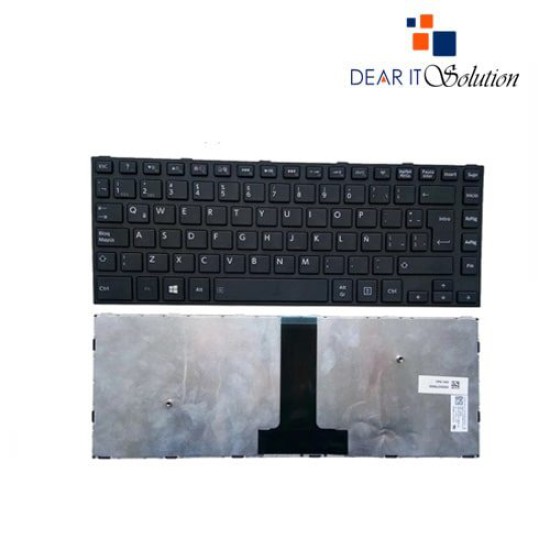
- Price: TK 900/-
- Stock: In Stock
- Model: C40

Key Features
- Laptop Keyboard for Toshiba
- Layout: US & UK
- Backlight Future:No
- Size: Medium
- Compatible With Toshiba C40
- Warranty:03 Month
| General Feature | |
| Brand | Acer |
| Model | C40 |
| Physical Attributes | |
| Color | Black |
| Backlit Option | No |
| Layout | Us and Uk |
| Compatible With | Toshiba Satellite C40-B C40-B-005 C40D-B H000069270 15H824827827Q 0KN0-VP1CB12 |
| Warranty Information | |
| Warranty | 03 Month |
Toshiba C40 Laptop Keyboard
The Toshiba C40 Laptop Keyboard is a premium-quality replacement designed to provide reliable performance and restore your laptop's functionality. Specifically crafted for the Toshiba C40 series, this keyboard ensures a perfect fit and seamless operation, making it an ideal choice for users who want to maintain the usability of their device without compromising on quality.
This keyboard features a standard QWERTY layout, making typing natural and efficient. Each key is precisely engineered to deliver responsive tactile feedback, ensuring accuracy and comfort during prolonged typing sessions. Whether you're working on a project, browsing the internet, or composing emails, the ergonomic design of this keyboard enhances your overall user experience.
Made from high-quality materials, the Toshiba C40 Laptop Keyboard is designed to withstand daily use. Its durable construction ensures that it can handle the rigors of constant typing while maintaining its appearance over time. The black matte finish is not only aesthetically pleasing but also resistant to smudges and wear, keeping your laptop looking sleek and professional.
Replacing your laptop keyboard is a cost-effective solution to extend the life of your Toshiba C40. This keyboard is designed for easy installation, allowing you to replace your old or malfunctioning keyboard quickly and without the need for professional assistance. This makes it a convenient and budget-friendly option for students, professionals, and everyday users alike.
With the Toshiba C40 Laptop Keyboard, you can enjoy a renewed typing experience that boosts productivity and comfort. Whether you’re tackling office tasks, taking online classes, or enjoying entertainment, this keyboard ensures smooth and uninterrupted performance. Its compatibility with the Toshiba C40 series guarantees a hassle-free fit, saving you time and effort during installation.
By choosing this replacement keyboard, you’re also contributing to a more sustainable environment by reducing electronic waste. Instead of discarding your laptop, this keyboard allows you to repair and reuse your existing device, helping you save money while being environmentally conscious.
Buy Toshiba C40 Laptop Keyboard from Dear IT Solution
In Bangladesh, you can get the original Toshiba C40 Laptop Keyboard from Dear IT Solution. We provide a wide selection of high-quality laptop keyboards to meet your needs. Order online or visit our store to purchase this keyboard at the best price. The Toshiba C40 Laptop Keyboard comes with a 3-month warranty, ensuring a reliable and durable product for your laptop.


