Menu
Your Cart

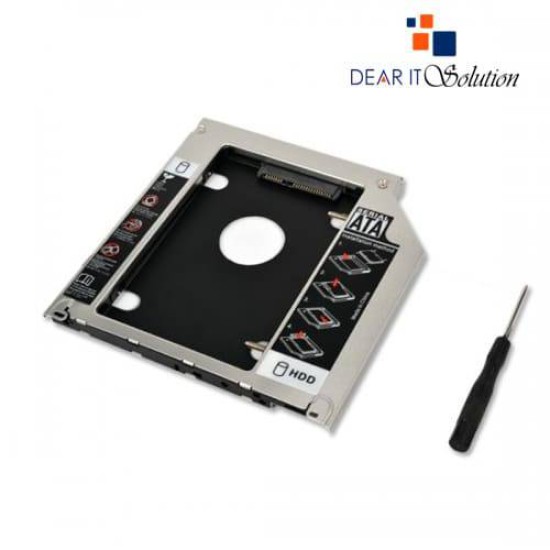
Second Hard Disk Drive (HDD) Caddy Drive for Laptop

Second Hard Disk Drive (HDD) Caddy Drive for Laptop
-23 %
Second Hard Disk Drive (HDD) Caddy Drive for Laptop
  • Price: TK 650/-
  • special price: TK 500/-
  • Stock: In Stock
  • Model: HDD CADDY
TK 500/-
TK 650/-
Ex Tax: TK 500/-

Key Features

    • Key Features
    • Model: HDD CADDY
    • Fully integrated into laptop
    • No cables/PSU/software needed
    • Uses 2.5" SATA hard drivesHigh-Performance Design
    Description

    Second Hard Disk Drive (HDD) Caddy - Secondary CD-ROM Storage for Laptop
    The Second Hard Disk Drive (HDD) Caddy is an innovative and practical solution for expanding the storage capacity of your laptop. Designed to replace the laptop's optical drive (CD/DVD-ROM), this caddy allows you to add a second HDD or SSD, providing additional space and improved performance for your data storage needs.

    Key Features
    Compatibility:
    Suitable for most laptops with a standard 12.7mm or 9.5mm CD/DVD-ROM drive slot, ensuring wide adaptability.

    Enhanced Storage:
    Converts the CD/DVD-ROM bay into an additional slot for a 2.5-inch HDD or SSD, increasing your laptop’s storage capacity.

    High-Performance Design:
    Supports SATA interface, ensuring fast and reliable data transfer rates between the laptop and the installed drive.

    Build Quality:
    Crafted with durable materials to withstand frequent use while keeping your additional drive securely in place.

    Ease of Installation:
    User-friendly design allows for quick and hassle-free installation without requiring advanced technical skills.

    Product Benefits
    Boosted Storage Capacity:
    Easily expand your laptop's storage space for large files, software, or additional operating systems.

    Cost-Effective Solution:
    Maximize the utility of your old HDDs or SSDs instead of investing in external drives.

    Versatile Application:
    Ideal for professionals, students, and gamers needing extra space for multimedia files, backups, or high-performance applications.

    Lightweight and Portable:
    Adds minimal weight to your laptop while providing maximum storage functionality.

    Why Choose This Caddy?
    The Second Hard Disk Drive Caddy is a practical and affordable way to upgrade your laptop’s storage without compromising performance. Whether you need space for additional data or a separate drive for backups, this accessory is a reliable and efficient choice.

    Buying Suggestion at Dear IT Solution
    Purchase your Second Hard Disk Drive Caddy from Dear IT Solution and enjoy the best quality and pricing in Bangladesh. Known for our reliable products and excellent customer service, we ensure a smooth shopping experience for all your tech needs.

    Review

    Write a review

    Note: HTML is not translated!
    Bad Good
    Critial Path: Hello world!
    Hello world!
    /** * @license * Copyright 2017 Google LLC * SPDX-License-Identifier: Apache-2.0 *//** * @fileoverview Diagnostic audit that lists all JavaScript libraries detected on the page */import {Audit} from '../audit.js'; import * as i18n from '../../lib/i18n/i18n.js';const UIStrings = { /** Title of a Lighthouse audit that provides detail on the Javascript libraries that are used on the page. */ title: 'Detected JavaScript libraries', /** Description of a Lighthouse audit that tells the user what this audit is detecting. This is displayed after a user expands the section to see more. No character length limits. */ description: 'All front-end JavaScript libraries detected on the page. [Learn more about this JavaScript library detection diagnostic audit](https://developer.chrome.com/docs/lighthouse/best-practices/js-libraries/).', /** Label for a column in a data table; entries will be the version numbers of the detected Javascript libraries. */ columnVersion: 'Version', };const str_ = i18n.createIcuMessageFn(import.meta.url, UIStrings);class JsLibrariesAudit extends Audit { /** * @return {LH.Audit.Meta} */ static get meta() { return { id: 'js-libraries', title: str_(UIStrings.title), scoreDisplayMode: Audit.SCORING_MODES.INFORMATIVE, description: str_(UIStrings.description), requiredArtifacts: ['Stacks'], }; }/** * @param {LH.Artifacts} artifacts * @return {LH.Audit.Product} */ static audit(artifacts) { const libDetails = artifacts.Stacks .filter(stack => stack.detector === 'js') // Don't show the fast paths in the table. .filter(stack => !stack.id.endsWith('-fast')) .map(stack => ({ name: stack.name, version: stack.version, npm: stack.npm, }));/** @type {LH.Audit.Details.Table['headings']} */ const headings = [ {key: 'name', valueType: 'text', label: str_(i18n.UIStrings.columnName)}, {key: 'version', valueType: 'text', label: str_(UIStrings.columnVersion)}, ]; const details = Audit.makeTableDetails(headings, libDetails);const debugData = { type: /** @type {const} */ ('debugdata'), stacks: artifacts.Stacks.map(stack => { return { id: stack.id, version: stack.version, }; }), };if (!libDetails.length) { return {score: null, notApplicable: true}; }return { score: 1, // Always pass for now. details: { ...details, debugData, }, }; } }export default JsLibrariesAudit; export {UIStrings};