Menu
Your Cart

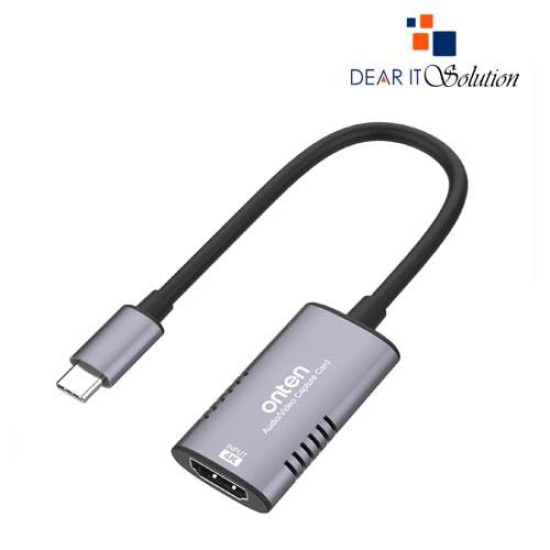
Onten OTN-UC323 Type-C Capture Card

Onten OTN-UC323 Type-C Capture Card
  • Stock:
  • Model: OTN-UC323
TK 0/-
Ex Tax: TK 0/-

Key Features

    • Brand:Onten
    • Model: OTN-UC323
    • TYPE- C Capture Card ,4K@30Hz
    • Material: Aluminium alloy
    • Warranty: 01 Year
    Description

    Onten OTN-UC323 Type-C Capture Card

    The Onten OTN-UC323 Type-C Capture Card is a premium device designed for seamless video capturing with exceptional quality. With support for 4K@30Hz input resolution, it delivers outstanding clarity and vibrant visuals, making it an ideal choice for content creators, streamers, and professionals.

    Constructed with a durable aluminum alloy shell, this capture card offers long-lasting performance while being lightweight and portable. Its Type-C interface ensures fast and stable connectivity, providing minimal latency and uninterrupted performance during use.

    The OTN-UC323 is compatible with various modern devices, enabling users to effortlessly record and stream their favorite content. Its plug-and-play functionality eliminates the need for driver installations, offering a hassle-free user experience. This device is perfect for live streaming, video recording, gaming, and online conferencing.

    Buying Suggestions from Dear IT Solution

    For the Onten OTN-UC323 Type-C Capture Card, purchase from Dear IT Solution to get the best value and quality. Enjoy competitive prices, fast shipping, and excellent customer support. Get yours today and experience high-performance video capturing like never before!


    Review

    Write a review

    Note: HTML is not translated!
    Bad Good
    Critial Path: Hello world!
    Hello world!
    /** * @license * Copyright 2017 Google LLC * SPDX-License-Identifier: Apache-2.0 *//** * @fileoverview Diagnostic audit that lists all JavaScript libraries detected on the page */import {Audit} from '../audit.js'; import * as i18n from '../../lib/i18n/i18n.js';const UIStrings = { /** Title of a Lighthouse audit that provides detail on the Javascript libraries that are used on the page. */ title: 'Detected JavaScript libraries', /** Description of a Lighthouse audit that tells the user what this audit is detecting. This is displayed after a user expands the section to see more. No character length limits. */ description: 'All front-end JavaScript libraries detected on the page. [Learn more about this JavaScript library detection diagnostic audit](https://developer.chrome.com/docs/lighthouse/best-practices/js-libraries/).', /** Label for a column in a data table; entries will be the version numbers of the detected Javascript libraries. */ columnVersion: 'Version', };const str_ = i18n.createIcuMessageFn(import.meta.url, UIStrings);class JsLibrariesAudit extends Audit { /** * @return {LH.Audit.Meta} */ static get meta() { return { id: 'js-libraries', title: str_(UIStrings.title), scoreDisplayMode: Audit.SCORING_MODES.INFORMATIVE, description: str_(UIStrings.description), requiredArtifacts: ['Stacks'], }; }/** * @param {LH.Artifacts} artifacts * @return {LH.Audit.Product} */ static audit(artifacts) { const libDetails = artifacts.Stacks .filter(stack => stack.detector === 'js') // Don't show the fast paths in the table. .filter(stack => !stack.id.endsWith('-fast')) .map(stack => ({ name: stack.name, version: stack.version, npm: stack.npm, }));/** @type {LH.Audit.Details.Table['headings']} */ const headings = [ {key: 'name', valueType: 'text', label: str_(i18n.UIStrings.columnName)}, {key: 'version', valueType: 'text', label: str_(UIStrings.columnVersion)}, ]; const details = Audit.makeTableDetails(headings, libDetails);const debugData = { type: /** @type {const} */ ('debugdata'), stacks: artifacts.Stacks.map(stack => { return { id: stack.id, version: stack.version, }; }), };if (!libDetails.length) { return {score: null, notApplicable: true}; }return { score: 1, // Always pass for now. details: { ...details, debugData, }, }; } }export default JsLibrariesAudit; export {UIStrings};