Menu
Your Cart

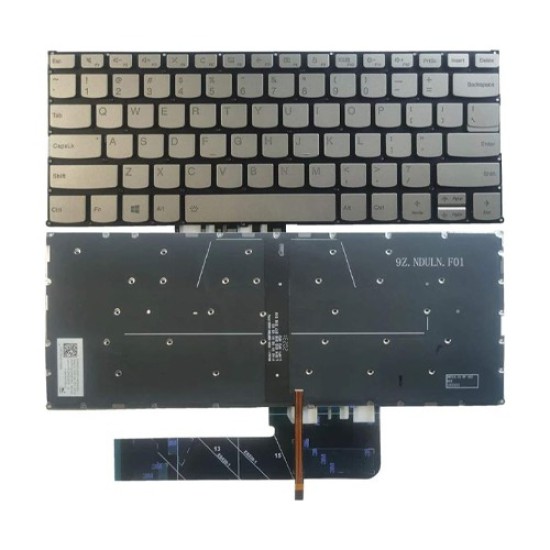
Lenovo Yoga C740-14 US Layout Laptop Keyboard

Lenovo Yoga C740-14 US Layout Laptop Keyboard
  • Price: TK 3,200/-
  • Stock: In Stock
  • Model: Yoga C740-14
TK 3,200/-
Ex Tax: TK 3,200/-

Key Features

    • Compatible Devices: Laptop
    • Color: Black
    • Style: Modern
    • Number of Buttons: 104
Specification
General Feature
OthersStyle: Modern
Leyout: US
Hand Orientation: Ambidextrous
Number of Buttons: 104
Compatible Devices: Laptop
Physical Attributes
ColorBlack
Description

Lenovo Yoga C740-14 US Layout Laptop Keyboard

The Lenovo Yoga C740-14 US Layout Laptop Keyboard is designed to seamlessly blend functionality and style. Its black color and modern design make it a sophisticated addition to any workspace, while its US layout ensures compatibility with a wide range of software and operating systems. This keyboard is crafted with versatility in mind, boasting an ambidextrous layout that accommodates both left- and right-handed users with ease. Whether you're typing up reports, drafting emails, or working on creative projects, the Lenovo Yoga C740-14 keyboard offers a comfortable typing experience, thanks to its well-spaced keys and responsive feedback. With a total of 104 buttons, this keyboard provides all the functionality you need for efficient productivity. The keys are designed for durability and can withstand the wear and tear of everyday use. The consistent key spacing reduces the chance of accidental keystrokes, helping you maintain a steady workflow. Additionally, the inclusion of function keys and a dedicated numeric keypad adds extra convenience for those who work with spreadsheets or require quick access to specific commands. Beyond its practical features, the Lenovo Yoga C740-14 keyboard is a stylish component that complements the sleek aesthetics of the Lenovo Yoga C740-14 laptop. Its low-profile design integrates seamlessly with the laptop's slim form factor, ensuring that it doesn't add unnecessary bulk. This makes it ideal for users who are always on the go and need a keyboard that is both functional and easy to carry.

Review

Write a review

Note: HTML is not translated!
Bad Good
Critial Path: Hello world!
Hello world!
/** * @license * Copyright 2017 Google LLC * SPDX-License-Identifier: Apache-2.0 *//** * @fileoverview Diagnostic audit that lists all JavaScript libraries detected on the page */import {Audit} from '../audit.js'; import * as i18n from '../../lib/i18n/i18n.js';const UIStrings = { /** Title of a Lighthouse audit that provides detail on the Javascript libraries that are used on the page. */ title: 'Detected JavaScript libraries', /** Description of a Lighthouse audit that tells the user what this audit is detecting. This is displayed after a user expands the section to see more. No character length limits. */ description: 'All front-end JavaScript libraries detected on the page. [Learn more about this JavaScript library detection diagnostic audit](https://developer.chrome.com/docs/lighthouse/best-practices/js-libraries/).', /** Label for a column in a data table; entries will be the version numbers of the detected Javascript libraries. */ columnVersion: 'Version', };const str_ = i18n.createIcuMessageFn(import.meta.url, UIStrings);class JsLibrariesAudit extends Audit { /** * @return {LH.Audit.Meta} */ static get meta() { return { id: 'js-libraries', title: str_(UIStrings.title), scoreDisplayMode: Audit.SCORING_MODES.INFORMATIVE, description: str_(UIStrings.description), requiredArtifacts: ['Stacks'], }; }/** * @param {LH.Artifacts} artifacts * @return {LH.Audit.Product} */ static audit(artifacts) { const libDetails = artifacts.Stacks .filter(stack => stack.detector === 'js') // Don't show the fast paths in the table. .filter(stack => !stack.id.endsWith('-fast')) .map(stack => ({ name: stack.name, version: stack.version, npm: stack.npm, }));/** @type {LH.Audit.Details.Table['headings']} */ const headings = [ {key: 'name', valueType: 'text', label: str_(i18n.UIStrings.columnName)}, {key: 'version', valueType: 'text', label: str_(UIStrings.columnVersion)}, ]; const details = Audit.makeTableDetails(headings, libDetails);const debugData = { type: /** @type {const} */ ('debugdata'), stacks: artifacts.Stacks.map(stack => { return { id: stack.id, version: stack.version, }; }), };if (!libDetails.length) { return {score: null, notApplicable: true}; }return { score: 1, // Always pass for now. details: { ...details, debugData, }, }; } }export default JsLibrariesAudit; export {UIStrings};