
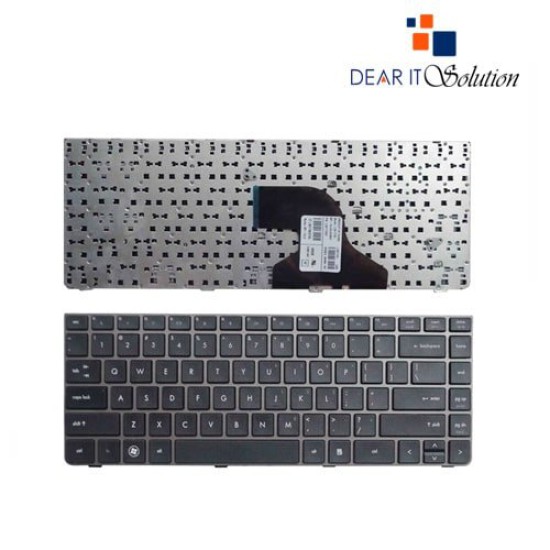
- Price: TK 850/-
- Stock: In Stock
- Model: ProBook 4430S 4330S 4331S 4431S Series

Key Features
- Laptop Keyboard for HP Probook 4430S
- Layout: US
- backlight Future:No
- Size: Medium
- Compatible: 4430S 4330S 4331S 4431S 4435S 4436S Series
- Warranty:03 Month
| General Feature | |
| Brand | Acer |
| Model | ProBook 4430S 4330S 4331S 4431S Series |
| Physical Attributes | |
| Color | Black |
| Backlit Option | no |
| Layout | Uk and us |
| Compatible With | ProBook 4430S 4330S 4331S 4431S Series |
| Warranty Information | |
| Warranty | 03 Month |
HP ProBook 4430S 4330S 4331S 4431S Series Laptop Keyboard
The HP ProBook 4430S 4330S 4331S 4431S Series Laptop Keyboard is a high-quality replacement designed to bring your laptop back to life with its reliable performance and smooth functionality. Tailored for the HP ProBook 4430S series and compatible models, this keyboard ensures a precise fit and seamless integration, making it an essential upgrade for your device.
Engineered with a standard QWERTY layout, this keyboard provides a user-friendly typing experience. Each key is crafted for precision, offering responsive tactile feedback to minimize typing errors and maximize productivity. Whether you’re writing reports, creating presentations, or simply browsing the internet, the well-spaced keys and ergonomic design enhance your typing comfort, even during extended use.
Durability is a standout feature of the HP ProBook 4430S 4330S 4331S 4431S Laptop Keyboard. Constructed from premium-quality materials, it is built to withstand daily wear and tear, ensuring a long service life. The black finish not only complements the sleek design of your HP ProBook but also resists smudges and fading, maintaining a polished look over time.
Replacing your laptop keyboard has never been easier. The HP ProBook 4430S 4330S 4331S 4431S Series Keyboard is designed for straightforward installation, allowing you to replace it with minimal effort. This makes it an ideal solution for users seeking a cost-effective and hassle-free repair option. Instead of purchasing a new laptop, this replacement keyboard enables you to restore your current device's full functionality at a fraction of the cost.
This keyboard is ideal for professionals, students, and everyday users who depend on their HP ProBook for tasks ranging from office work to entertainment. Its responsive performance and durable design make it an excellent choice for enhancing your laptop’s productivity and usability. The HP ProBook 4430S 4330S 4331S 4431S Keyboard is compatible with multiple models in the series, ensuring versatile use across various devices.
Investing in this replacement keyboard is an environmentally friendly solution, as it allows you to extend the life of your laptop and reduce electronic waste. Its affordability and dependability make it a smart choice for anyone looking to maintain their HP ProBook’s performance and appearance.
Buy HP ProBook 4430S 4330S 4331S 4431S Series Laptop Keyboard from Dear IT Solution
In Bangladesh, you can purchase the original HP ProBook 4430S 4330S 4331S 4431S Series Laptop Keyboard from Dear IT Solution. We offer a wide range of laptop keyboards to meet your needs. Place your order online or visit our store to buy this keyboard at the best price. The HP ProBook 4430S 4330S 4331S 4431S Laptop Keyboard comes with a 3-month warranty, ensuring you receive a reliable and high-quality product.a


