Menu
Your Cart

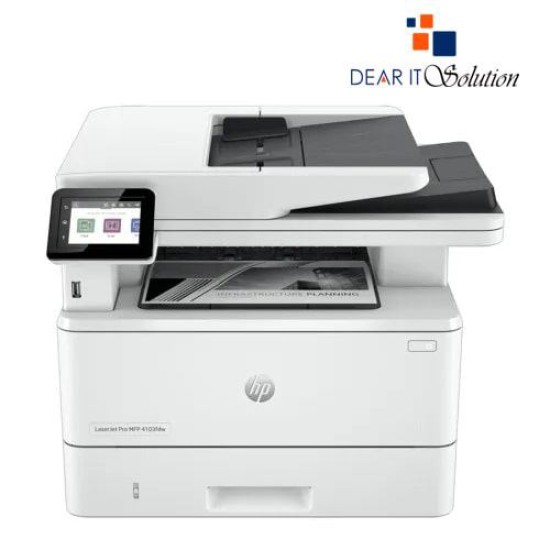
HP LaserJet Pro MFP 4103fdn Multifunction Laser Printer

HP LaserJet Pro MFP 4103fdn Multifunction Laser Printer
  • Price: TK 69,000/-
  • Stock: In Stock
  • Model: LaserJet Pro MFP 4103fdn
  • MPN: 2Z628A
TK 69,000/-
Ex Tax: TK 69,000/-

Key Features

    • MPN: 2Z628A
    • Model: LaserJet Pro MFP 4103fdn
    • Functions: Print, Copy, Scan, Fax
    • Print Speed: up to 42 ppm
    • Duplex Printing: Automatic
    • Connectivity Options: USB, LAN
Specification
General Feature
BrandHP
ModelLaserJet Pro MFP 4103fdn
Print
Technology Laser
Print Speed Print speed black (ISO, letter): Up to 42 ppm Print speed black (ISO, A4): Up to 40 ppm
Print Resolution600 x 600 dpi (Normal) 1200 x 1200 dpi (Best)
Duty Cycle up to (Yield)Up to 80000 Pages
DuplexAutometic
Support
Toner/ Cartridge/ Refill HP 151A Black Original LaserJet Toner W1510A. HP 151X Black Original LaserJet Toner, W1510X.
Technical Info
ConnectivityUSB, LAN
Power
Power Consumption220-volt input voltage: 220 to 240 VAC (+/- 10%), 50/60 Hz (+/- 2 Hz)
Software
Software infoWindows 7 / 8 / 10 / 11 ,Windows Client OS, Android, iOS; Mobile OS; macOS 10.15 Catalina; macOS 11 Big Sur; macOS 12 Monterey; Chrome OS.
Physical Attributes
ColorWhite
Dimensions420 x 390 x 323 mm
Weight12.6 kg
Warranty Information
Warranty01 Year
Description

HP LaserJet Pro MFP 4103fdn Multifunction Laser Printer

The HP LaserJet Pro MFP 4103fdn is a powerful multifunction monochrome laser printer designed to enhance productivity in busy office environments. This all-in-one printer allows you to print, scan, copy, and fax documents with exceptional quality and speed. Offering print speeds of up to 40 pages per minute (ppm), it ensures quick and efficient output for high-volume tasks.

With automatic two-sided printing (duplex), the helps you save paper and reduce costs, while the 250-sheet input tray and 100-sheet output bin provide seamless handling of medium to large print jobs. The printer’s 250-sheet output tray minimizes paper handling and ensures organized document management.

The MFP 4103fdn features Gigabit Ethernet for fast and reliable network connectivity, allowing multiple users to easily share the printer. It also offers mobile printing solutions, including Apple AirPrint, Google Cloud Print, and Wi-Fi Direct, giving you flexibility and convenience in printing from smartphones and tablets.

Designed for energy efficiency, the 4103fdn is ENERGY STAR certified and features HP Auto-On/Auto-Off technology, ensuring that the printer operates only when needed, reducing power consumption and operating costs.

With robust security features such as Secure Boot and TPM (Trusted Platform Module), your data remains safe while ensuring the printer is protected from unauthorized access.


BUYING SUGGESTIONS FROM DEAR IT SOLUTION

At Dear IT Solution, we offer the HP LaserJet Pro MFP 4103fdn Multifunction Laser Printer at the best price in Bangladesh. This versatile printer is ideal for businesses and home offices that require high-quality printing, scanning, copying, and faxing, all in one device.

The MFP 4103fdn is perfect for teams that need to print high volumes quickly and efficiently while maintaining excellent quality. Its fast print speeds, flexible connectivity options, and secure features make it a reliable choice for modern office environments.

Choose Dear IT Solution for the best quality product insured in Bangladesh. We offer expert customer support and ensure that you receive the best value for your purchase.

Upgrade your office with the HP LaserJet Pro MFP 4103fdn  Multifunction Laser Printer and experience enhanced productivity and efficiency in your workflow.

Review

Write a review

Note: HTML is not translated!
Bad Good
Critial Path: Hello world!
Hello world!
/** * @license * Copyright 2017 Google LLC * SPDX-License-Identifier: Apache-2.0 *//** * @fileoverview Diagnostic audit that lists all JavaScript libraries detected on the page */import {Audit} from '../audit.js'; import * as i18n from '../../lib/i18n/i18n.js';const UIStrings = { /** Title of a Lighthouse audit that provides detail on the Javascript libraries that are used on the page. */ title: 'Detected JavaScript libraries', /** Description of a Lighthouse audit that tells the user what this audit is detecting. This is displayed after a user expands the section to see more. No character length limits. */ description: 'All front-end JavaScript libraries detected on the page. [Learn more about this JavaScript library detection diagnostic audit](https://developer.chrome.com/docs/lighthouse/best-practices/js-libraries/).', /** Label for a column in a data table; entries will be the version numbers of the detected Javascript libraries. */ columnVersion: 'Version', };const str_ = i18n.createIcuMessageFn(import.meta.url, UIStrings);class JsLibrariesAudit extends Audit { /** * @return {LH.Audit.Meta} */ static get meta() { return { id: 'js-libraries', title: str_(UIStrings.title), scoreDisplayMode: Audit.SCORING_MODES.INFORMATIVE, description: str_(UIStrings.description), requiredArtifacts: ['Stacks'], }; }/** * @param {LH.Artifacts} artifacts * @return {LH.Audit.Product} */ static audit(artifacts) { const libDetails = artifacts.Stacks .filter(stack => stack.detector === 'js') // Don't show the fast paths in the table. .filter(stack => !stack.id.endsWith('-fast')) .map(stack => ({ name: stack.name, version: stack.version, npm: stack.npm, }));/** @type {LH.Audit.Details.Table['headings']} */ const headings = [ {key: 'name', valueType: 'text', label: str_(i18n.UIStrings.columnName)}, {key: 'version', valueType: 'text', label: str_(UIStrings.columnVersion)}, ]; const details = Audit.makeTableDetails(headings, libDetails);const debugData = { type: /** @type {const} */ ('debugdata'), stacks: artifacts.Stacks.map(stack => { return { id: stack.id, version: stack.version, }; }), };if (!libDetails.length) { return {score: null, notApplicable: true}; }return { score: 1, // Always pass for now. details: { ...details, debugData, }, }; } }export default JsLibrariesAudit; export {UIStrings};