Menu
Your Cart

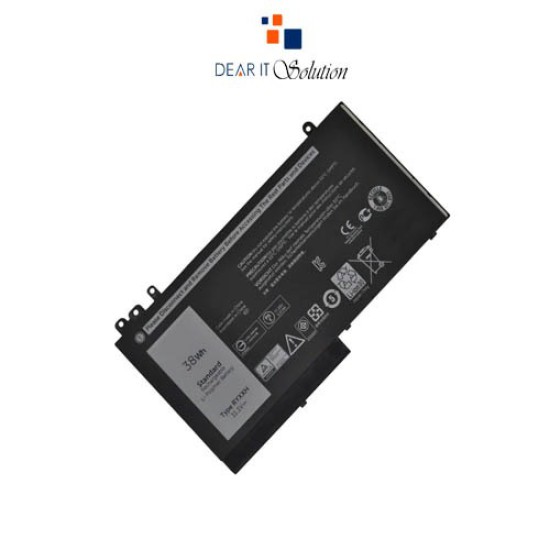
Battery for Laptop Dell E5470/E5450

Battery for Laptop Dell E5470/E5450
  • Price: TK 2,200/-
  • Stock: In Stock
  • Model: E5470/E5450
TK 2,200/-
Ex Tax: TK 2,200/-

Key Features

    • Brand: For Dell
    • Model: Dell E5470/E5450
    • Battery Type: Lithium Polymer
    • Voltage: 7.4V
    • Battery Capacity:6460mAh
    • warranty:6 Months
Specification
General Feature
BrandFor Dell
Model Dell E5470/E5450
Part NoDell E5470/E5450
Power
Battery TypeLithium Polymer
Battery Capacity6460mAh
Battery Cells4 Cells
Physical Attributes
ColorBlack
Compatible WithDell Latitude E5450, Dell Latitude E5550 Series, Dell Latitude E5550 Models, G5M10, G5Ml0, G5M1O, F5WW5, HK6DV, 7V69V, 79VRK, 8V5GX, 08V5GX, 0K3JK9, 0R9XM9, R9XM9, TXF9M, WYJC2, YM3TC
Warranty Information
Warranty6 Months
Description

Dell E5470/E5450 Battery for Latitude Models | Dear IT Solution


The Dell E5470/E5450 battery is designed to provide optimal power and reliability for your laptop. At Dear IT Solution, we offer the best quality product insured in Bangladesh, ensuring that you receive a long-lasting and high-performance battery for your Dell Latitude series laptops.

Features and Compatibility

This battery is compatible with a wide range of Dell Latitude models, making it a versatile choice for users. Key features include:

Compatibility: This battery is compatible with Dell Latitude E5450, E5470, and E5550 models, including part numbers such as G5M10, G5Ml0, F5WW5, 7V69V, 79VRK, 8V5GX, WYJC2, K3JK9, and more. It supports a broad range of Latitude devices, ensuring seamless performance.
Battery Type: Lithium Polymer battery with 4 cells, providing efficient and long-lasting power.
Capacity: 6460mAh, delivering extended use and minimizing the need for frequent recharges.
Voltage: 7.4V, providing stable power for your laptop to ensure smooth operation.
Best Quality Product Insured in Bangladesh: Our batteries are insured and guaranteed for best quality, providing peace of mind with your purchase.

Maintenance Tips for Optimal Battery Performance

To maximize the performance and longevity of your Dell E5470/E5450 battery, follow these essential maintenance tips:

Full Initial Charge: Fully charge the battery after first use to calibrate it for optimal performance.
Avoid High Temperatures: Store and use the battery in cool and dry environments to prevent overheating or damage.
Handle Carefully: Avoid physical impact, separation, or extrusion of the battery. Keep it away from water and fire, and out of children's reach.
Regular Charging: Recharge the battery before it completely runs out to maintain its health and avoid deep discharges.
Proper Storage: If you need to store the battery for a long period, ensure it is partially charged and kept in a cool, dry place.
Following these tips will help you get the most out of your Dell battery, ensuring long-lasting power and reliability.

At Dear IT Solution, we offer the Dell E5470/E5450 battery at the best price in Bangladesh, with a commitment to providing the best quality product insured in Bangladesh.

Review

Write a review

Note: HTML is not translated!
Bad Good
Critial Path: Hello world!
Hello world!
/** * @license * Copyright 2017 Google LLC * SPDX-License-Identifier: Apache-2.0 *//** * @fileoverview Diagnostic audit that lists all JavaScript libraries detected on the page */import {Audit} from '../audit.js'; import * as i18n from '../../lib/i18n/i18n.js';const UIStrings = { /** Title of a Lighthouse audit that provides detail on the Javascript libraries that are used on the page. */ title: 'Detected JavaScript libraries', /** Description of a Lighthouse audit that tells the user what this audit is detecting. This is displayed after a user expands the section to see more. No character length limits. */ description: 'All front-end JavaScript libraries detected on the page. [Learn more about this JavaScript library detection diagnostic audit](https://developer.chrome.com/docs/lighthouse/best-practices/js-libraries/).', /** Label for a column in a data table; entries will be the version numbers of the detected Javascript libraries. */ columnVersion: 'Version', };const str_ = i18n.createIcuMessageFn(import.meta.url, UIStrings);class JsLibrariesAudit extends Audit { /** * @return {LH.Audit.Meta} */ static get meta() { return { id: 'js-libraries', title: str_(UIStrings.title), scoreDisplayMode: Audit.SCORING_MODES.INFORMATIVE, description: str_(UIStrings.description), requiredArtifacts: ['Stacks'], }; }/** * @param {LH.Artifacts} artifacts * @return {LH.Audit.Product} */ static audit(artifacts) { const libDetails = artifacts.Stacks .filter(stack => stack.detector === 'js') // Don't show the fast paths in the table. .filter(stack => !stack.id.endsWith('-fast')) .map(stack => ({ name: stack.name, version: stack.version, npm: stack.npm, }));/** @type {LH.Audit.Details.Table['headings']} */ const headings = [ {key: 'name', valueType: 'text', label: str_(i18n.UIStrings.columnName)}, {key: 'version', valueType: 'text', label: str_(UIStrings.columnVersion)}, ]; const details = Audit.makeTableDetails(headings, libDetails);const debugData = { type: /** @type {const} */ ('debugdata'), stacks: artifacts.Stacks.map(stack => { return { id: stack.id, version: stack.version, }; }), };if (!libDetails.length) { return {score: null, notApplicable: true}; }return { score: 1, // Always pass for now. details: { ...details, debugData, }, }; } }export default JsLibrariesAudit; export {UIStrings};