Menu
Your Cart

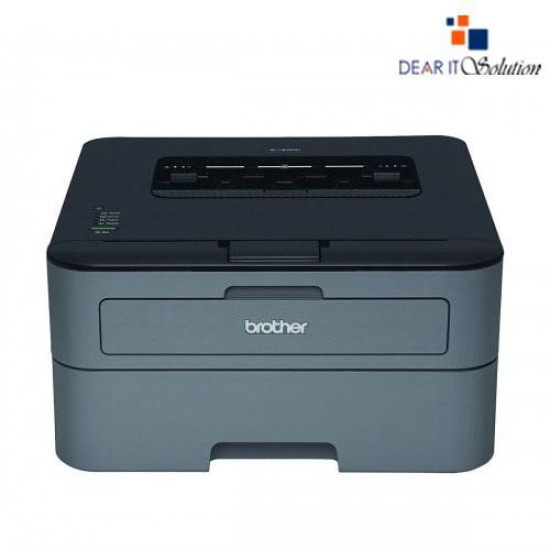
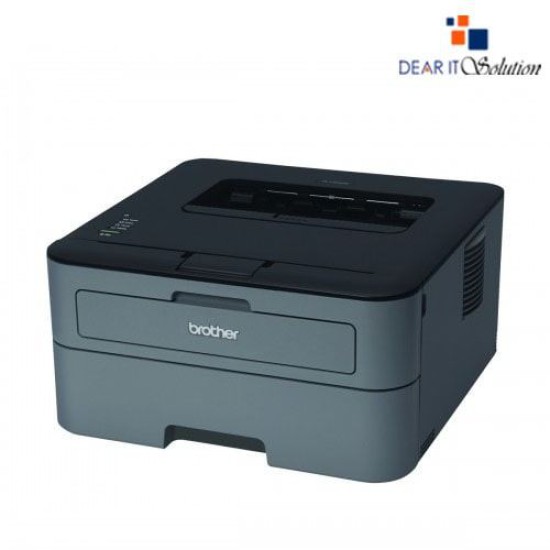
Brother HL-L2320D Auto Duplex Laser Printer

Brother HL-L2320D Auto Duplex Laser Printer
  • Price: TK 14,200/-
  • Stock: In Stock
  • Model: HL-L2320D
TK 14,200/-
Ex Tax: TK 14,200/-

Key Features

    • Model: Brother HL-L2320D
    • Resolution up to 2400 x 600 dpi
    • Fast laser printing
    • Easily print two-sided documents
    • Toner Save mode
    Specification
    General Feature
    BrandBrother
    ModelBrother HL-L2320D
    Print
    TechnologyLaser
    Print Speed(Black)- 30ppm
    Print Resolution2400 x 600dpi
    Duty Cycle up to (Yield)10000 Pages
    DuplexAutomatic
    Support
    Toner/ Cartridge/ RefillToner- TN-2355 (2600pg) , TN-2305(1200pg), Drum-DR-2305( 10000pg) (Please make sure your existing & mentioned toner/cartridge/ink bottle models are the same before buying a new one)
    Technical Info
    ConnectivityHi-Speed USB 2.0
    Power
    Power ConsumptionEPA ENERGY STAR TEC Value: 1.2 kWh/Week AC 120V 50/60Hz
    Software
    Software infoWindows, Mac OS, Linux
    Physical Attributes
    ColorBlack
    Dimensions355.6 x 182.88 x 360.68mm
    Weight6.80Kg
    Warranty Information
    Warranty1-year Limited warranty, an Adapter/Power Cable with no warranty, and also a Box Mandatory While Claiming.
    Description

    Brother HL-L2320D Auto Duplex Laser Printer – High-Speed Monochrome Printing (30 PPM)

    The Brother HL-L2320D Auto Duplex Laser Printer is a compact, high-performance monochrome laser printer designed for home offices and small businesses that need fast, reliable, and professional-quality printing. With a print speed of up to 30 pages per minute (PPM) and automatic duplex printing, this printer helps you save time and paper while increasing productivity.

    Built to handle everyday printing needs, the HL-L2320D offers sharp text and crisp graphics with up to 2400 x 600 dpi resolution. Whether you're printing reports, invoices, or study materials, this printer delivers consistent, high-quality results with every page.

    The device features a 250-sheet capacity adjustable paper tray that handles letter- or legal-size paper, minimizing the need for constant refills. There's also a manual feed slot for printing on envelopes and other specialty media, offering flexibility for various print tasks.

    With USB 2.0 connectivity, setup is quick and straightforward, allowing you to connect the printer directly to your computer. It's compatible with Windows, macOS, and Linux, making it a versatile solution for multi-platform environments.

    One of the standout features of the HL-L2320D is its Auto Duplex Printing, which enables automatic two-sided printing. This not only saves paper but also helps reduce printing costs, making it an eco-friendly and budget-conscious choice for any workspace.

    Thanks to Brother’s high-yield toner technology, you can print more and replace less often. The printer supports Brother TN-660 high-yield toner cartridges, helping lower the cost per page and extend the time between refills.

    With its sleek and compact design, the HL-L2320D fits easily on a desk or shelf without taking up much space. Its durable construction ensures reliable operation over time, even in demanding print environments.

    Review

    Write a review

    Note: HTML is not translated!
    Bad Good
    Critial Path: Hello world!
    Hello world!
    /** * @license * Copyright 2017 Google LLC * SPDX-License-Identifier: Apache-2.0 *//** * @fileoverview Diagnostic audit that lists all JavaScript libraries detected on the page */import {Audit} from '../audit.js'; import * as i18n from '../../lib/i18n/i18n.js';const UIStrings = { /** Title of a Lighthouse audit that provides detail on the Javascript libraries that are used on the page. */ title: 'Detected JavaScript libraries', /** Description of a Lighthouse audit that tells the user what this audit is detecting. This is displayed after a user expands the section to see more. No character length limits. */ description: 'All front-end JavaScript libraries detected on the page. [Learn more about this JavaScript library detection diagnostic audit](https://developer.chrome.com/docs/lighthouse/best-practices/js-libraries/).', /** Label for a column in a data table; entries will be the version numbers of the detected Javascript libraries. */ columnVersion: 'Version', };const str_ = i18n.createIcuMessageFn(import.meta.url, UIStrings);class JsLibrariesAudit extends Audit { /** * @return {LH.Audit.Meta} */ static get meta() { return { id: 'js-libraries', title: str_(UIStrings.title), scoreDisplayMode: Audit.SCORING_MODES.INFORMATIVE, description: str_(UIStrings.description), requiredArtifacts: ['Stacks'], }; }/** * @param {LH.Artifacts} artifacts * @return {LH.Audit.Product} */ static audit(artifacts) { const libDetails = artifacts.Stacks .filter(stack => stack.detector === 'js') // Don't show the fast paths in the table. .filter(stack => !stack.id.endsWith('-fast')) .map(stack => ({ name: stack.name, version: stack.version, npm: stack.npm, }));/** @type {LH.Audit.Details.Table['headings']} */ const headings = [ {key: 'name', valueType: 'text', label: str_(i18n.UIStrings.columnName)}, {key: 'version', valueType: 'text', label: str_(UIStrings.columnVersion)}, ]; const details = Audit.makeTableDetails(headings, libDetails);const debugData = { type: /** @type {const} */ ('debugdata'), stacks: artifacts.Stacks.map(stack => { return { id: stack.id, version: stack.version, }; }), };if (!libDetails.length) { return {score: null, notApplicable: true}; }return { score: 1, // Always pass for now. details: { ...details, debugData, }, }; } }export default JsLibrariesAudit; export {UIStrings};