
Menu
Your Cart

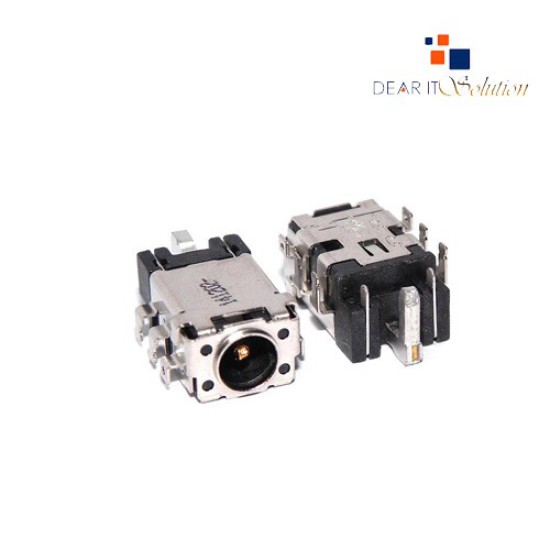
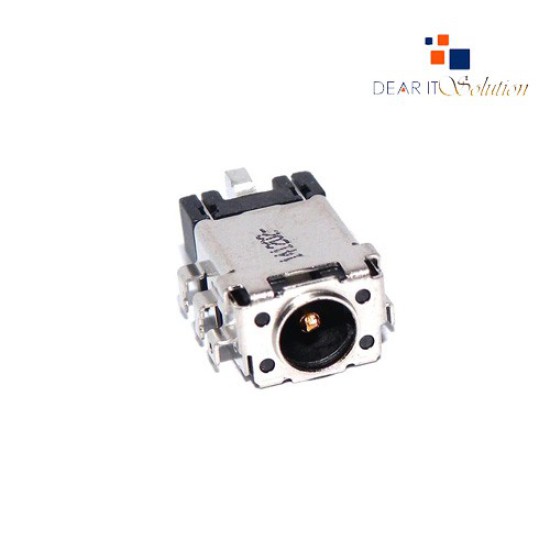
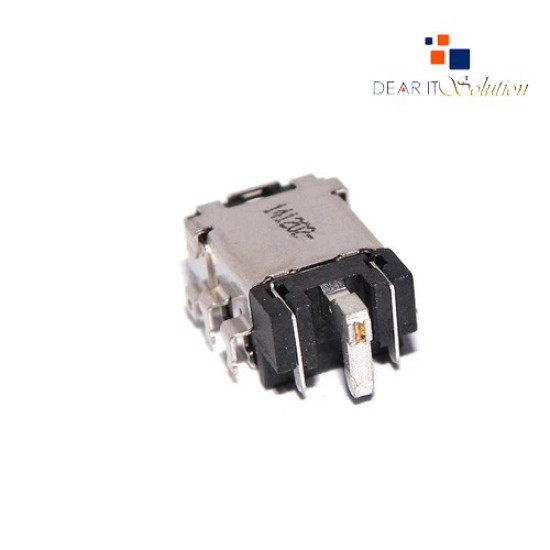
ASUS DC Power Jack Socket Connector Port

ASUS DC Power Jack Socket Connector Port
  • Price: TK 0/-
  • Stock: In Stock
  • Model: ASUS DC Power Jack
TK 0/-
Ex Tax: TK 0/-

Key Features

    • Model: ASUS DC Power Jack Socket Connector
    • Build Quality: OEM-Grade Metal Shell & Copper Pins
    • Compatibility: Supports Multiple ASUS Laptop Series
    • Power Handling: Stable Charging & Safe Power Input
    • Durability: Strong Solder Legs for Long-Term Use
    • Use Case: Ideal for Fixing No-Charge & Loose-Port Issues

    সকল ধরনের Laptop DC Power Jack Connector Available

Description

ASUS DC Power Jack Socket Connector Port – OEM Replacement | Best Price in BD

Overview & Product Quality

The ASUS DC Power Jack Socket Connector Port is a high-quality OEM replacement component designed to restore stable charging and power delivery in compatible ASUS laptops. If your laptop is facing issues like loose charging, intermittent power, no charging, overheating near the adapter area, or broken DC jack pins, replacing the damaged port with this OEM-grade connector ensures safe and reliable performance.

This DC jack is built with durable copper terminals, reinforced metal housing, and heat-resistant insulation to maintain a secure connection between the laptop motherboard and charger. Its precise pin alignment and strong solder legs ensure long-term durability, even with frequent plug-and-unplug use. Whether your old port is physically damaged, burnt, or not detecting the adapter properly, this replacement restores smooth and stable power flow for trouble-free operation.

Engineered to match original ASUS motherboard layouts, the connector provides consistent charging efficiency without power drops, spark issues, or random shutdowns. It helps prevent battery drain, charging interruptions, and motherboard damage caused by faulty power input ports.

Installation & Compatibility

The ASUS DC Power Jack is designed for perfect alignment with the laptop’s original motherboard solder pads and chassis structure. Technicians can install it easily using standard soldering tools, ensuring a secure and clean fit. Once installed, the port delivers stable charging, proper adapter detection, and uninterrupted power delivery for everyday tasks, heavy usage, and long working sessions.

Review

Write a review

Note: HTML is not translated!
Bad Good
Critial Path: Hello world!
Hello world!
/** * @license * Copyright 2017 Google LLC * SPDX-License-Identifier: Apache-2.0 *//** * @fileoverview Diagnostic audit that lists all JavaScript libraries detected on the page */import {Audit} from '../audit.js'; import * as i18n from '../../lib/i18n/i18n.js';const UIStrings = { /** Title of a Lighthouse audit that provides detail on the Javascript libraries that are used on the page. */ title: 'Detected JavaScript libraries', /** Description of a Lighthouse audit that tells the user what this audit is detecting. This is displayed after a user expands the section to see more. No character length limits. */ description: 'All front-end JavaScript libraries detected on the page. [Learn more about this JavaScript library detection diagnostic audit](https://developer.chrome.com/docs/lighthouse/best-practices/js-libraries/).', /** Label for a column in a data table; entries will be the version numbers of the detected Javascript libraries. */ columnVersion: 'Version', };const str_ = i18n.createIcuMessageFn(import.meta.url, UIStrings);class JsLibrariesAudit extends Audit { /** * @return {LH.Audit.Meta} */ static get meta() { return { id: 'js-libraries', title: str_(UIStrings.title), scoreDisplayMode: Audit.SCORING_MODES.INFORMATIVE, description: str_(UIStrings.description), requiredArtifacts: ['Stacks'], }; }/** * @param {LH.Artifacts} artifacts * @return {LH.Audit.Product} */ static audit(artifacts) { const libDetails = artifacts.Stacks .filter(stack => stack.detector === 'js') // Don't show the fast paths in the table. .filter(stack => !stack.id.endsWith('-fast')) .map(stack => ({ name: stack.name, version: stack.version, npm: stack.npm, }));/** @type {LH.Audit.Details.Table['headings']} */ const headings = [ {key: 'name', valueType: 'text', label: str_(i18n.UIStrings.columnName)}, {key: 'version', valueType: 'text', label: str_(UIStrings.columnVersion)}, ]; const details = Audit.makeTableDetails(headings, libDetails);const debugData = { type: /** @type {const} */ ('debugdata'), stacks: artifacts.Stacks.map(stack => { return { id: stack.id, version: stack.version, }; }), };if (!libDetails.length) { return {score: null, notApplicable: true}; }return { score: 1, // Always pass for now. details: { ...details, debugData, }, }; } }export default JsLibrariesAudit; export {UIStrings};