Menu
Your Cart

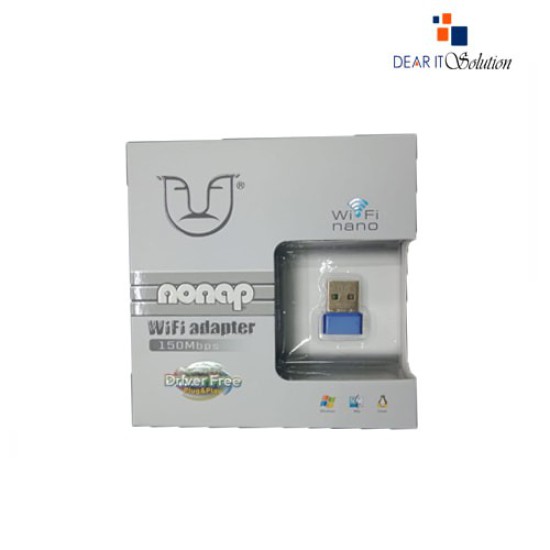
ALFA W103 USB Wireless 150 Mbps Nano Receiver

ALFA W103 USB Wireless 150 Mbps Nano Receiver
-9 %
ALFA W103 USB Wireless 150 Mbps Nano Receiver
  • Price: TK 430/-
  • special price: TK 390/-
  • Stock: In Stock
  • Model: w103
TK 390/-
TK 430/-
Ex Tax: TK 390/-

Key Features

    • Model: ALFA W103
    • Wi‑Fi Standard: IEEE 802.11 b/g/n
    • Max Speed: 150 Mbps (2.4 GHz)
    • Interface: USB 2.0, nano form factor
    • Chipset: Realtek RTL8188
    • Security: WEP 64/128-bit, WPA/WPA2 (TKIP/AES)
    • OS Support: Windows XP–11, macOS, Linux
    • Advanced: Monitor mode & packet injection support
    • Soft-AP: Yes, for hotspot creation
    • Range: Typical indoor use
Description

Tiny Yet Powerful: ALFA W103 150 Mbps USB Nano Wi‑Fi Receiver

The ALFA W103 is a sleek, nano-sized USB Wi‑Fi adapter offering 150 Mbps speeds over the 2.4 GHz band. Compliant with IEEE 802.11 b/g/n standards and powered by the Realtek 8188 chipset, it delivers reliable wireless connectivity ideal for everyday tasks like browsing, streaming, or simple file transfers. Its plug-and-play design works seamlessly with Windows, macOS, and Linux, and it even supports advanced features such as monitor mode and packet injection, which are ideal for network diagnostics or pen-testing setups.

Despite its tiny size, the W103 supports 64/128-bit WEP and WPA/WPA2 encryption, and includes a handy Soft‑AP utility for turning your PC into a Wi‑Fi hotspot. With a compact footprint and no warranty, it’s an affordable, easy-to-use solution for everyday wireless needs.

Review

Write a review

Note: HTML is not translated!
Bad Good
Critial Path: Hello world!
Hello world!
/** * @license * Copyright 2017 Google LLC * SPDX-License-Identifier: Apache-2.0 *//** * @fileoverview Diagnostic audit that lists all JavaScript libraries detected on the page */import {Audit} from '../audit.js'; import * as i18n from '../../lib/i18n/i18n.js';const UIStrings = { /** Title of a Lighthouse audit that provides detail on the Javascript libraries that are used on the page. */ title: 'Detected JavaScript libraries', /** Description of a Lighthouse audit that tells the user what this audit is detecting. This is displayed after a user expands the section to see more. No character length limits. */ description: 'All front-end JavaScript libraries detected on the page. [Learn more about this JavaScript library detection diagnostic audit](https://developer.chrome.com/docs/lighthouse/best-practices/js-libraries/).', /** Label for a column in a data table; entries will be the version numbers of the detected Javascript libraries. */ columnVersion: 'Version', };const str_ = i18n.createIcuMessageFn(import.meta.url, UIStrings);class JsLibrariesAudit extends Audit { /** * @return {LH.Audit.Meta} */ static get meta() { return { id: 'js-libraries', title: str_(UIStrings.title), scoreDisplayMode: Audit.SCORING_MODES.INFORMATIVE, description: str_(UIStrings.description), requiredArtifacts: ['Stacks'], }; }/** * @param {LH.Artifacts} artifacts * @return {LH.Audit.Product} */ static audit(artifacts) { const libDetails = artifacts.Stacks .filter(stack => stack.detector === 'js') // Don't show the fast paths in the table. .filter(stack => !stack.id.endsWith('-fast')) .map(stack => ({ name: stack.name, version: stack.version, npm: stack.npm, }));/** @type {LH.Audit.Details.Table['headings']} */ const headings = [ {key: 'name', valueType: 'text', label: str_(i18n.UIStrings.columnName)}, {key: 'version', valueType: 'text', label: str_(UIStrings.columnVersion)}, ]; const details = Audit.makeTableDetails(headings, libDetails);const debugData = { type: /** @type {const} */ ('debugdata'), stacks: artifacts.Stacks.map(stack => { return { id: stack.id, version: stack.version, }; }), };if (!libDetails.length) { return {score: null, notApplicable: true}; }return { score: 1, // Always pass for now. details: { ...details, debugData, }, }; } }export default JsLibrariesAudit; export {UIStrings};