Menu
Your Cart

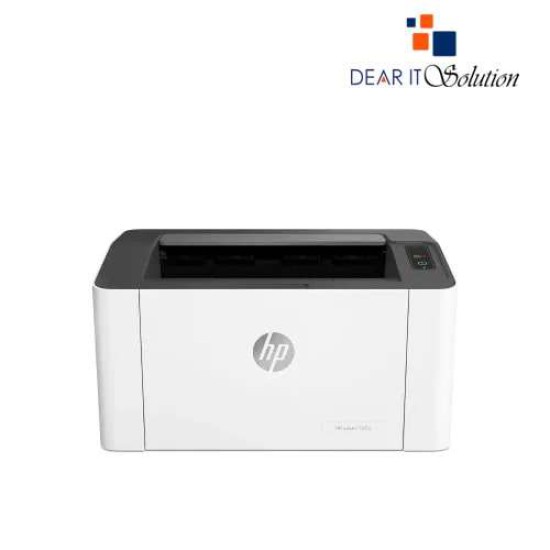
HP Laser 107a Laser Printer

HP Laser 107a Laser Printer
Out Of Stock
HP Laser 107a Laser Printer
  • Stock: Out Of Stock
  • Model: Laser 107a
  • MPN: 4ZB77A
TK 11,500/-
Ex Tax: TK 11,500/-

Key Features

    • Model: Laser 107a
    • Print speed: Up to 20 ppm (normal, A4)
    • Resolution: Up to 1200 x 1200 dpi
    • Processor Speed: 400 MHz
    • Connectivity: Hi-Speed USB 2.0 port
Specification
General Feature
BrandHP
ModelLaser 107a
Print
TechnologyLaser
Print SpeedPrint speed black (normal, letter): Up to 21 ppm
Print Resolution1200 x 1200dpi
Duty Cycle up to (Yield)10000 Pages
DuplexManual
Support
Toner/ Cartridge/ RefillHP 106A Black, HP 107A Black (1,000 Pages) (Please make sure your existing & mentioned toner/cartridge model are same before buying new one)
Technical Info
ConnectivityUSB
Power
Power Consumption110 to 127 VAC, 50/60Hz and 220 to 240 VAC, 50/60Hz, 320 watts (Active Printing), 33 watts (Ready), 1.1 watts (Sleep), 0.2 watts (Manual off), 0.2 watts (Auto off/Manual on)
Software
Software infoWindows 7, 8, 8.1, 10, Server 2008 R2, 2012, 2016
Physical Attributes
ColorWhite
Dimensions331 x 178 x 215mm
Weight4.18Kg
Warranty Information
Warranty1-year Limited warranty, an Adapter/Power Cable with no warranty, and also a Box Mandatory While Claiming.
Description

HP Laser 107a Laser Printer

The HP Laser 107a Laser Printer is a compact and efficient monochrome laser printer designed for home and small office use. It delivers sharp, professional-quality prints with a resolution of up to 1200 x 1200 dpi, ensuring crisp text and detailed graphics. With its sleek design, this printer fits seamlessly into any workspace, offering reliable performance in a small footprint.

Capable of printing up to 21 pages per minute (ppm), the HP Laser 107a ensures fast and efficient output, making it ideal for printing documents, invoices, reports, and more. Its 150-sheet input tray and 100-sheet output bin provide convenience for handling larger print jobs. The manual duplex printing feature helps save paper and reduces printing costs.

The HP Laser 107a is designed for ease of use, featuring a straightforward interface and quick setup process. It supports standard USB connectivity, allowing you to connect effortlessly to your computer or laptop. Its energy-efficient design and auto-on/auto-off technology help reduce power consumption without compromising performance.


BUYING SUGGESTIONS FROM DEAR IT SOLUTION

At Dear IT Solution, we offer the HP Laser 107a Laser Printer at the best price in Bangladesh. This laser printer is perfect for users who need a reliable and affordable solution for their daily printing needs.

With features like fast printing speed, high-quality output, and energy-efficient design, the HP Laser 107a is a practical choice for both personal and professional use. Its compact size makes it a great fit for any desk or small office space.

Choose Dear IT Solution to get the best quality product insured in Bangladesh along with top-notch customer support. We ensure a seamless buying experience and provide expert guidance to help you make the right choice.

Upgrade to the HP Laser 107a Laser Printer today and enjoy reliable performance and high-quality prints. Visit Dear IT Solution for the best deals and exceptional customer service.

Review

Write a review

Note: HTML is not translated!
Bad Good
Critial Path: Hello world!
Hello world!
/** * @license * Copyright 2017 Google LLC * SPDX-License-Identifier: Apache-2.0 *//** * @fileoverview Diagnostic audit that lists all JavaScript libraries detected on the page */import {Audit} from '../audit.js'; import * as i18n from '../../lib/i18n/i18n.js';const UIStrings = { /** Title of a Lighthouse audit that provides detail on the Javascript libraries that are used on the page. */ title: 'Detected JavaScript libraries', /** Description of a Lighthouse audit that tells the user what this audit is detecting. This is displayed after a user expands the section to see more. No character length limits. */ description: 'All front-end JavaScript libraries detected on the page. [Learn more about this JavaScript library detection diagnostic audit](https://developer.chrome.com/docs/lighthouse/best-practices/js-libraries/).', /** Label for a column in a data table; entries will be the version numbers of the detected Javascript libraries. */ columnVersion: 'Version', };const str_ = i18n.createIcuMessageFn(import.meta.url, UIStrings);class JsLibrariesAudit extends Audit { /** * @return {LH.Audit.Meta} */ static get meta() { return { id: 'js-libraries', title: str_(UIStrings.title), scoreDisplayMode: Audit.SCORING_MODES.INFORMATIVE, description: str_(UIStrings.description), requiredArtifacts: ['Stacks'], }; }/** * @param {LH.Artifacts} artifacts * @return {LH.Audit.Product} */ static audit(artifacts) { const libDetails = artifacts.Stacks .filter(stack => stack.detector === 'js') // Don't show the fast paths in the table. .filter(stack => !stack.id.endsWith('-fast')) .map(stack => ({ name: stack.name, version: stack.version, npm: stack.npm, }));/** @type {LH.Audit.Details.Table['headings']} */ const headings = [ {key: 'name', valueType: 'text', label: str_(i18n.UIStrings.columnName)}, {key: 'version', valueType: 'text', label: str_(UIStrings.columnVersion)}, ]; const details = Audit.makeTableDetails(headings, libDetails);const debugData = { type: /** @type {const} */ ('debugdata'), stacks: artifacts.Stacks.map(stack => { return { id: stack.id, version: stack.version, }; }), };if (!libDetails.length) { return {score: null, notApplicable: true}; }return { score: 1, // Always pass for now. details: { ...details, debugData, }, }; } }export default JsLibrariesAudit; export {UIStrings};