Menu
Your Cart

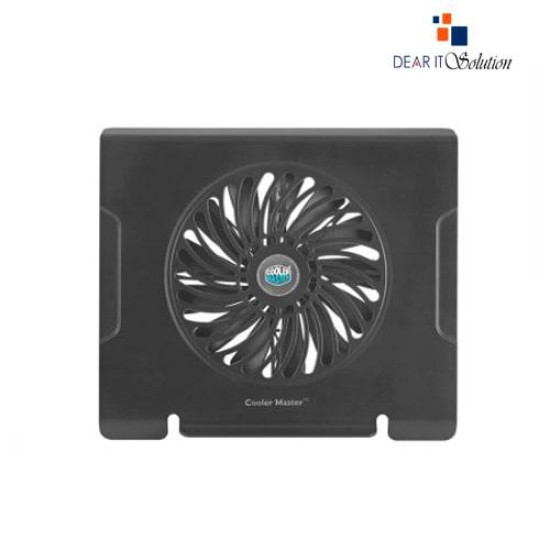
Cooler Master NotePal CMC3 Laptop Cooling Pad

Cooler Master NotePal CMC3 Laptop Cooling Pad
  • Price: TK 850/-
  • Stock: In Stock
  • Model: CMC3
TK 850/-
Ex Tax: TK 850/-

Key Features

    • Silent 200mm fan for efficient laptop cooling
    • Supports laptops up to 15.6 inches
    • Angled design enhances typing comfort and airflow
    • Durable construction with metal mesh surface
    • USB-powered plug-and-play operation
Description

Effective Cooling & Ergonomic Design: Cooler Master NotePal CMC3

The Cooler Master NotePal CMC3 is a premium laptop cooling pad built for users who prioritize performance, portability, and comfort. Designed for laptops up to 15.6 inches, it features a silent 200mm fan that delivers high airflow to keep your device cool during intensive tasks like gaming, editing, or extended work sessions.

Its angled design improves both ergonomics and air ventilation, helping to reduce wrist strain and laptop heat. The durable plastic and metal mesh construction ensures long-lasting performance in a lightweight form factor.


Buy from Dear IT Solution – Genuine Cooler Master Gear, Fast & Secure Delivery

At Dear IT Solution, we provide original Cooler Master cooling solutions like the NotePal CMC3, tested before shipping for assured quality. While this product is offered without warranty, we guarantee authenticity, safe packaging, and fast delivery across Bangladesh.

Review

Write a review

Note: HTML is not translated!
Bad Good
Critial Path: Hello world!
Hello world!
/** * @license * Copyright 2017 Google LLC * SPDX-License-Identifier: Apache-2.0 *//** * @fileoverview Diagnostic audit that lists all JavaScript libraries detected on the page */import {Audit} from '../audit.js'; import * as i18n from '../../lib/i18n/i18n.js';const UIStrings = { /** Title of a Lighthouse audit that provides detail on the Javascript libraries that are used on the page. */ title: 'Detected JavaScript libraries', /** Description of a Lighthouse audit that tells the user what this audit is detecting. This is displayed after a user expands the section to see more. No character length limits. */ description: 'All front-end JavaScript libraries detected on the page. [Learn more about this JavaScript library detection diagnostic audit](https://developer.chrome.com/docs/lighthouse/best-practices/js-libraries/).', /** Label for a column in a data table; entries will be the version numbers of the detected Javascript libraries. */ columnVersion: 'Version', };const str_ = i18n.createIcuMessageFn(import.meta.url, UIStrings);class JsLibrariesAudit extends Audit { /** * @return {LH.Audit.Meta} */ static get meta() { return { id: 'js-libraries', title: str_(UIStrings.title), scoreDisplayMode: Audit.SCORING_MODES.INFORMATIVE, description: str_(UIStrings.description), requiredArtifacts: ['Stacks'], }; }/** * @param {LH.Artifacts} artifacts * @return {LH.Audit.Product} */ static audit(artifacts) { const libDetails = artifacts.Stacks .filter(stack => stack.detector === 'js') // Don't show the fast paths in the table. .filter(stack => !stack.id.endsWith('-fast')) .map(stack => ({ name: stack.name, version: stack.version, npm: stack.npm, }));/** @type {LH.Audit.Details.Table['headings']} */ const headings = [ {key: 'name', valueType: 'text', label: str_(i18n.UIStrings.columnName)}, {key: 'version', valueType: 'text', label: str_(UIStrings.columnVersion)}, ]; const details = Audit.makeTableDetails(headings, libDetails);const debugData = { type: /** @type {const} */ ('debugdata'), stacks: artifacts.Stacks.map(stack => { return { id: stack.id, version: stack.version, }; }), };if (!libDetails.length) { return {score: null, notApplicable: true}; }return { score: 1, // Always pass for now. details: { ...details, debugData, }, }; } }export default JsLibrariesAudit; export {UIStrings};